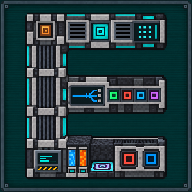
Petrogenic Synthesizer
Makes stone, obsidian, basalt, granite and the other rocks from water and lava, one product at a time.
 ⟲ Drag to turn
| Type | Machine |
| Size | 1 block |
| Energy | 100 J/t (40 FE/t) without upgrades, for Cobblestone (other products scale by their own recipe); 160,000 J (64,000 FE) stored (petrogenic_synthesis.synthesizerEnergyUsage / synthesizerEnergyStorage) |
| Upgrades | Speed, Energy, Muffling (Mekanism) |
| Side configuration | yes (Mekanism), items, fluids and energy |
What it does
Section titled “What it does”The Synthesizer holds two small tanks, water and lava, and turns them into one chosen rock at a time using energy: pick a product in its screen, and it produces that block for as long as water, lava and energy keep coming. Only one product is active at once; changing product abandons the block currently in progress, like changing recipe on any Mekanism machine.
The same 13 products are available on both the Synthesizer and the Petrogenic Synthesis Plant: the difference between the two machines is speed, fluid and energy use, buffer size and parallelism, never which products are available:
| Product | Water / block | Lava / block | Time (× Cobblestone) | Energy (× Cobblestone) |
|---|---|---|---|---|
| Cobblestone | 250 mB | 250 mB | ×1 | ×1 |
| Stone | 250 mB | 250 mB | ×1 | ×1.25 |
| Smooth Stone | 250 mB | 500 mB | ×2 | ×2 |
| Obsidian | 1,000 mB | 1,000 mB | ×4 | ×2 |
| Basalt | 500 mB | 500 mB | ×2 | ×1.5 |
| Granite | 250 mB | 500 mB | ×2 | ×2 |
| Diorite | 250 mB | 500 mB | ×2 | ×2 |
| Andesite | 250 mB | 500 mB | ×2 | ×2 |
| Cobbled Deepslate | 250 mB | 375 mB | ×1.5 | ×1.5 |
| Deepslate | 250 mB | 500 mB | ×2 | ×2 |
| Tuff | 500 mB | 500 mB | ×2 | ×1.5 |
| Blackstone | 250 mB | 500 mB | ×2 | ×2 |
| Smooth Basalt | 500 mB | 750 mB | ×3 | ×3 |
A modpack can add, remove or change these recipes with a datapack (recipe type mekanismengineering:petrogenic); the
Synthesizer’s product row pages through however many exist.
Crafting
Section titled “Crafting”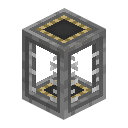



- 2 × Basic Fluid Tank
- 3 × any Advanced Control Circuit
- 2 × any Infused Alloy
- 1 × Steel Casing
- 1 × Electric Pump
- T: Basic Fluid Tank, ×2
- C: any Advanced Control Circuit (
c:circuits/advanced), ×3 - A: any Infused Alloy (
mekanism:alloys/infused), ×2 - S: Steel Casing, ×1
- P: Electric Pump, ×1
Result: 1 Petrogenic Synthesizer. An Electric Pump that already carries energy or upgrades keeps that data in the new Synthesizer.
Getting started
Section titled “Getting started”- Craft the Synthesizer (see above).
- Place it.
- Connect a water source or pipe to its left face and a lava source or pipe to its right face: matching the machine’s two tanks, or reassign either face in the side‑configuration tab.
- Feed energy into the back face.
- Open the screen and click one of the products in the row to choose it.
- Finished blocks push out of the front face into whatever is placed there; the chosen product stays framed in teal in the row and shows on the machine’s roof.
The interface
Section titled “The interface”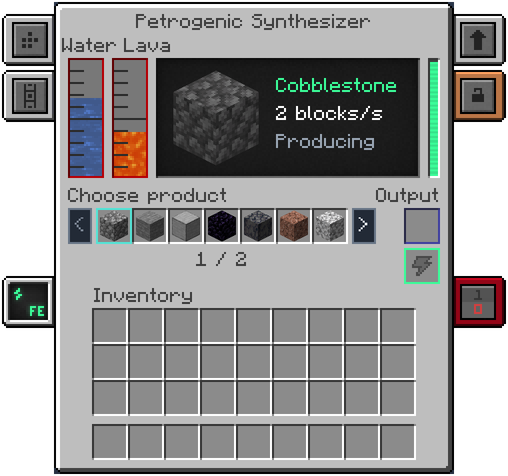
- Two fluid gauges (top left), named “Water” and “Lava”: the water tank, then the lava tank.
- Screen (top middle): the chosen product drawn large, then its name, its speed (“2 blocks/s”) and its state once: “Producing”, or what is wrong, such as “Waiting for water”, “Waiting for lava”, “Slowed: short of water” (or lava, or energy), “Insufficient energy”, “Output full” or “Stopped by redstone”. With no product it says “No product chosen”. Hover the screen for the state in full and for the water, lava and energy used a tick (“Water 25 mB/t”, “Lava 25 mB/t”, “Energy 100 J/t” with the unit your energy setting uses).
- Energy bar and energy tab (right): stored energy, with Mekanism’s usual low-energy warning.
- Choose product: one row of seven products, with an arrow on each side and a page counter such as “1 / 2”. The 13 products make two pages. Click a product to choose it (one click, whichever page you are on); the chosen one is framed in teal. Hovering a product shows its name and “250 mB of water and 250 mB of lava a block”. With more than 7 products (a modpack addition) the arrows page through the rest.
- Output slot and energy slot (right): the output slot holds the finished block.
On the block itself, the chosen product shows flat on the machine’s roof. With nothing chosen the roof square stays teal.
Automation
Section titled “Automation”By default, water comes in on the left, lava on the right, energy at the back, and finished blocks push out of the front: every one of those four faces can be set otherwise in Mekanism’s own side‑configuration tab, for items, fluids and energy. Breaking the Synthesizer drops a single item that keeps both tanks, its energy, its upgrades and the chosen product.
Configuration
Section titled “Configuration”Section petrogenic_synthesis of mekanismengineering-server.toml (shared with the Petrogenic Synthesis
Plant; only the Synthesizer’s own keys are listed here):
| Key | Default | Range | Meaning |
|---|---|---|---|
synthesizerTicks | 10.0 | 0.05–72,000.0 | Ticks for one Cobblestone without Speed Upgrades (other products take their recipe’s time multiple). |
synthesizerEnergyUsage | 100 J/t | 0–max | Energy drawn per tick on Cobblestone without upgrades. |
synthesizerEnergyStorage | 160,000 J | 1–max | Energy stored without Energy Upgrades. |
synthesizerTankCapacity | 16,000 mB | 1,000–max | Capacity of each of the two tanks (water, lava). |
Speed follows Mekanism’s own upgrade formula (a multiplier of ×10 at 8 Speed Upgrades by default). Unlike the Plant, the Synthesizer’s water and lava use per block also grows with Speed Upgrades: for Cobblestone:
| Speed Upgrades | Speed | Energy | Water | Lava |
|---|---|---|---|---|
| 0 | 2 blocks/s | 100 J/t | 25 mB/t | 25 mB/t |
| 4 | 6.3 blocks/s | 1,000 J/t | 250 mB/t | 250 mB/t |
| 8 | 20 blocks/s | 10,000 J/t | 2,500 mB/t | 2,500 mB/t |
Tips and troubleshooting
Section titled “Tips and troubleshooting”- Speed Upgrades make the Synthesizer thirsty on purpose: eight of them give ten times the speed but a hundred times the water and lava use a tick (fluid use scales with the square of the speed factor). At high Speed, buckets will not keep up: a real pump, such as the Industrial Fluid Pump, does.
- Both tanks are small (16,000 mB) by design: at full speed they hold only a few ticks of work, so a steady supply matters more than a big buffer.
- Obsidian is the most demanding product: 1,000 mB of water and 1,000 mB of lava per block, four times the time and twice the energy of Cobblestone.
- The output has a single slot: with nothing to receive it, or the front face blocked, finished blocks wait there until something can take them.
- For much higher throughput, larger buffers and self‑supplied water or lava, see the Petrogenic Synthesis Plant.
In-game texts
Section titled “In-game texts”What the game itself shows for this item: the description under Shift, the tooltips and the JEI information page, word for word.
Petrogenic Synthesizer
- Description (hold Shift)
- Makes stone, obsidian, basalt, granite and the other rocks from water and lava, one product at a time. Water in on the left, lava on the right, energy at the back, the blocks out in front: every face can be set otherwise in its side configuration. Speed Upgrades make it up to ten times faster, and a hundred times thirstier a tick: feed it with pumps.
- JEI · Role
- Makes the chosen rock block from water, lava and energy.
- JEI · Supply
- Water and lava: each of the two fluid sides accepts both resources.
- JEI · Supply
- Energy from the back or from a chargeable item; the product is chosen in the interface.
- JEI · Result
- The product goes into the output slot, then is ejected at the front.
- JEI · Good to know
- Speed, Energy and Muffling upgrades.
- JEI · Good to know
- The Hydro and Magma modules are for the Plant only.
Written from the mod's own wiki and data files (05759a70, 2026-11-07).Mod v1.3 for Minecraft 1.21.1 (NeoForge, Mekanism 1.21.1-10.7.19.85) and Minecraft 1.20.1 (NeoForge, Mekanism 1.20.1-10.4.16.80).Block and item pictures are drawn from the game's models and textures; Mekanism's are under the MIT licence.Not an official Minecraft product, not approved by or associated with Mojang or Microsoft.