
Precision Logistical Distributor
Splits buffered items across its output sides in balanced or weighted shares, exact over time.
 ⟲ Drag to turn
| Type | Machine |
| Size | 1 block |
| Energy | None |
| Upgrades | Speed (up to 8) |
| Side configuration | Yes (Mekanism) |
What it does
Section titled “What it does”The Distributor buffers items on one or more input sides and hands them out to its output sides every cycle, either in equal shares (Balanced) or in shares you set face by face (Weighted). It hands out whole items and keeps count of every one, so over time each output gets exactly its share. Its screen shows the ideal split of a reference batch; a single real batch may differ from it by an item or two (see Rounding across batches below).
Each cycle, a cursor moves across the 9 buffer slots and collects one batch: every unit of the same item and the same components, wherever it sits in the buffer, up to 576 items (nine stacks of 64). That batch is then split across every currently connected output side:
- Balanced: equal shares, a plain round-robin: a batch of 61 across three outputs delivers 21/20/20, then 20/21/20, then 20/20/21 on the next batches, so no single output is always favoured.
- Weighted: shares proportional to the weights you set per output (1 to 99,999).
Fair over time
Section titled “Fair over time”The split doesn’t depend on how the items arrive. Items are handed out one at a time by a smooth weighted round-robin that remembers where it stands, so 100 items arriving one by one, in small lots or as a full stack all end up split the same way: 75/25 stays 75/25 even when a slow transporter or a hopper feeds a single item at a time. One kind of item flowing on its own stays within an item or two of your ratio at any moment; a kind mixed in with others stays within three.
- Per item type: each kind of item (item and components, the 32 kinds routed last) keeps its own balance. Stone and iron arriving in turn are each split at your ratio instead of being sorted one per output.
- The whole stream: every item also counts in a common balance of what the stream owes each output. Items the machine doesn’t remember (brand new, all different such as named or damaged items, or more than 32 kinds) start from it, so they keep your ratio too, however they’re grouped. A mix of many kinds in random order can still drift from the exact ratio overall by a few items, without it building up.
- An output that can’t take items (full, removed, or the side an item came in through) is skipped and keeps its place, and meanwhile the other outputs share each item at their own ratio: a slow machine on one side doesn’t tilt the others. Once it takes items again it gets its normal share back. It doesn’t catch up on what it missed.
- Changing a setting (mode, a weight, a face’s role) starts the new split from the very next item.
- This balance is saved with the machine: it survives a restart, a chunk reload, and breaking and placing it back.
Wait for every output changes what happens when an output refuses part of its share: OFF redistributes a refused share to the other outputs, according to their weights, until nothing more fits; ON only sends the batch if every output can take its whole share; otherwise nothing moves and the status reads “Waits for every output”. Any direction the batch entered from (even after a merge, a rotation, or a reconfiguration) is excluded as a destination for that batch, so it never bounces straight back where it came from.
When an output fills exactly, the two modes can place the next item on different outputs: OFF takes the full output out of the next turn, while ON keeps the original split for the whole batch. Both keep every item.
Crafting
Section titled “Crafting”




- 4 × any Reinforced Alloy
- 1 × any Elite Control Circuit
- 2 × Elite Logistical Transporter
- 1 × Steel Casing
- 1 × Logistical Sorter
Getting started
Section titled “Getting started”- Craft the Distributor (see Crafting above).
- Place it where it can receive items on one side and reach the inventories you want to feed on the others.
- Right-click it to open its screen.
- Set its sides with Mekanism’s side-configuration tab (or sneak + right-click with the Configurator): choose Input, Output, or Input/Output per side. By default the back is Input and the front, left and right are Output.
- Pick a Distribution mode: Balanced or Weighted.
- If Weighted, press “Configure distribution”, pick an output face, and use − / + to set how many items of the reference batch that face should receive (Shift-click for ±10, Ctrl-click for the minimum or maximum).
- Feed items into any Input side. The Distributor buffers up to 9 stacks and starts distributing automatically at every cycle.
The interface
Section titled “The interface”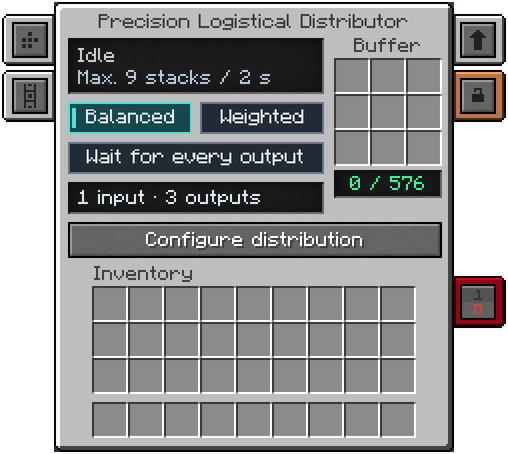
- Status: Active, Idle, Blocked, Buffer full, No output, Waits for every output, Disabled, or Stopped by redstone.
- Cadence: “Max. 9 stacks / X s”, with a tooltip spelling out the tick count and the 576-item cap.
- Mode: Balanced / Weighted buttons; the active one is highlighted.
- Wait for every output: one button, lit when on (the state is the lit bar, as for Balanced and Weighted), with a tooltip describing the current state and what the next click will do. The same option is on the “Configure distribution” window’s bottom bar.
- Inputs / Outputs: a short summary of configured sides, such as “1 input · 3 outputs”.
- Buffer: a 3×3 grid (9 slots), with a “count / capacity” readout; deposit, withdrawal and shift-click work through the normal container.
- Configure distribution: opens a fixed 3D dimetric view of the block and its six neighbours, connected by
straight lines along the cube’s edges. A ↻ button turns the view a quarter turn (Shift-click: the other way); the
block itself never moves. “Your side” marks where you’re standing. Each neighbour shows its Mekanism face role
and, for an output, its share and item count for the batch below; hovering shows the block, its role, its exact or
approximate share, and its rate in items/s.
- The bottom bar shows Balanced/Weighted, Wait for every output, the selected face’s role button, and − / + around a percentage and item count (e.g. “60.00% · 38 / 64”) with a progress bar. Click changes the count by 1, Shift-click by 10, Ctrl-click jumps to the minimum (1) or the maximum. The batch size itself doesn’t change: the other outputs absorb the difference proportionally, starting with the ones you haven’t set by hand yet. From Balanced, changing a count switches the machine to Weighted.
- “Preview for [n] items” (1 to 99,999, defaults to the last batch size you set, 64 out of the box) and the computed
rate in items/s and items/t:
min(batch, buffer capacity) × 20 / ticks per cycle, assuming enough input and free outputs.
Rounding across batches: the numbers shown in “Configure distribution” describe the ideal split of one reference batch and stay still from one view to the next. Real batches follow the fair-over-time balance above, so a single batch may differ from them by an item or two while the total keeps your ratio. A share that doesn’t divide exactly is shown with a “≈” and a tooltip: “The extra item alternates between batches.” A share without “≈” divides exactly.
Automation
Section titled “Automation”- Faces are configured like any Mekanism machine (side-configuration tab, Configurator in sneak + right-click, or a Configuration Card): NONE, INPUT, OUTPUT, or INPUT/OUTPUT, relative to the block’s facing (FRONT/BACK/LEFT/RIGHT/ TOP/BOTTOM). INPUT accepts external insertion (transporters, hoppers, other mods); OUTPUT exposes a connectable handler that never accepts insertion or extraction: the Distributor never pulls from a neighbouring inventory itself.
- Breaking it keeps its inventory, faces, upgrades, security and redstone mode (Mekanism’s own components), plus its mode, Wait for every output setting, weights and fairness balance, copied into the dropped item.
- Refused overflow goes back into the buffer as soon as there’s room; identical stacks merge; the overflow list holds at most 64 entries and the rest is dropped on the ground near the machine (never destroyed), with one warning logged per machine.
- No energy is used; only Speed Upgrades change the cycle length (see below).
Configuration
Section titled “Configuration”Section distributor of mekanismengineering-server.toml:
| Key | Default | Range | Meaning |
|---|---|---|---|
enabled | true | boolean | Enables the Distributor. Disabled, it refuses input and stops distributing. |
intervalTicks | 40 | 40–1200 | Base ticks between distribution cycles, before Speed Upgrades. Saved values below 40 from older versions are corrected to 40 on load. |
Speed upgrades and the interval
Section titled “Speed upgrades and the interval”The Distributor accepts only Speed Upgrades (up to 8, the standard Mekanism item): no Energy, Muffling, Anchor
or other upgrade slots. The base cycle length is intervalTicks (40 ticks = 2 s at 20 TPS by default); each Speed
Upgrade shortens it through Mekanism’s own formula, driven by Mekanism’s maxUpgradeMultiplier (10 by default): with
8 Speed Upgrades and default settings, one cycle drops to 4 ticks (0.2 s). The installed upgrades are managed in
Mekanism’s Upgrades tab, and the screen’s cadence line updates to match. The first cycle after placing the block, or after an
upgrade is added or removed, can start immediately.
Tips and troubleshooting
Section titled “Tips and troubleshooting”- Waits for every output means the current batch’s shares were refused by at least one output while Wait for every output is on; nothing moves until every output can take its full share. Turn Wait for every output off if you’d rather have refused shares redistributed automatically.
- Buffer full means all 9 slots are occupied by items the Distributor hasn’t managed to send out yet: check that your outputs are connected and have room.
- A percentage in the routing view describes the configured shares, not guaranteed available capacity: if a destination’s real inventory is smaller than its share, or several faces lead to the same storage, a delivery can still come up short. Refusals stay in the buffer; deliveries already made are never rolled back. An output that takes less than it said it would is not skipped like a full one: its real share drops by what it refused.
- Feeding a Distributor one item at a time is fine: the ratio holds over time whatever the batch size. If an output seems to get less than its share, check that it isn’t full or missing (it’s skipped meanwhile, without catching up afterwards).
In-game texts
Section titled “In-game texts”What the game itself shows for this item: the description under Shift, the tooltips and the JEI information page, word for word.
Precision Logistical Distributor
- Description (hold Shift)
- Routes buffered items to its output sides with exact balanced or weighted shares. Configure sides like any Mekanism machine; Speed Upgrades shorten the routing delay.
- JEI · Role
- Shares items evenly, or by weight, between neighbouring machines.
- JEI · Supply
- Items on the input faces you configure.
- JEI · Result
- Items shared between the inventories on the output faces.
- JEI · Good to know
- Balanced or weighted sharing; Wait for every output option.
- JEI · Good to know
- An output that refuses an item never makes it disappear.
Written from the mod's own wiki and data files (05759a70, 2026-11-07).Mod v1.3 for Minecraft 1.21.1 (NeoForge, Mekanism 1.21.1-10.7.19.85) and Minecraft 1.20.1 (NeoForge, Mekanism 1.20.1-10.4.16.80).Block and item pictures are drawn from the game's models and textures; Mekanism's are under the MIT licence.Not an official Minecraft product, not approved by or associated with Mojang or Microsoft.