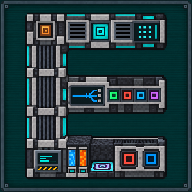
Quantum Digital Miner
Endgame evolution of the Digital Miner: same filters and settings, radius up to 128, eight times the mining speed, energy and items through quantum frequencies, and relocation to a fresh area with the Digital Miner Companion.
New in 1.2Quick filters and saved filter listsTwo shortcuts in the New filter window: ready-made ore tag filters, and filter lists saved under a name to load on any miner. Only the filter list changes, every other setting stays as it is.How it works ↓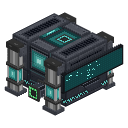 ⟲ Drag to turn
| Type | Machine |
| Stack size | 1 (on 1.21.1 since 1.2.1, as on 1.20.1; stacks already in a world keep their count) |
| Size | 3 × 3 footprint, 2 blocks tall (main block + 17 bounding blocks, same footprint as Mekanism’s Digital Miner) |
| Energy | Follows Mekanism’s Digital Miner formula (usage.digitalMiner, storage.digitalMiner) × quantum_miner.energyMultiplier (4.0 by default): 4,000 J/t and 200,000 J of storage with no upgrades, more with Speed and Energy Upgrades, radius and height range |
| Upgrades | Speed, Energy, Anchor, Stone Generator (Mekanism’s own Digital Miner upgrades) |
| Side configuration | No, one of only three machines in the mod without Mekanism’s side configuration screen (the others are the Petrogenic Synthesis Plant and the Quantum Network Controller); item flow follows the fixed port layout below, switched between Local, Quantum and QIO from the Quantum link column |
What it does
Section titled “What it does”The Quantum Digital Miner mines blocks in a cube around itself exactly like Mekanism’s Digital Miner: same filters (item, block tag or mod id, with an inverse mode and a required replacement target), the same search and mining rules, and the same Speed, Energy, Anchor and Stone Generator Upgrades. What changes:
- Radius: up to 128 blocks (server limit
quantum_miner.maxRadius), against the Digital Miner’s own limit of 32. - Speed: mines eight times faster than a Digital Miner with the same Speed Upgrades (
quantum_miner.speedMultiplier; four times before 1.3, and a server config still at the old 4.0 is moved to 8.0 once when 1.3 first loads it). - A limit per game tick: whatever the speed and however many Speed Upgrades or Time Overclockers it has, one Quantum Digital Miner mines at most 32 blocks in a game tick (
quantum_miner.maxBlocksPerGameTick;maxBlocksPerTick, 8, still limits each single run of its work). - Energy and items through quantum frequencies: besides its own ports and battery (like the Digital Miner), it can draw energy from, and send mined items to or pull replacement blocks from, a quantum frequency shared with other machines (Mekanism’s Entangloporter-style buffer: one item type, one energy pool) or the QIO network. Choose the source for Energy, Import and Export independently from the Quantum link column.
- Relocation: once its current zone is fully mined, it can be moved to a neighbouring zone it has never mined, using a Digital Miner Companion: see Digital Miner Companion for how. The Digital Miner Companion can also link to, read and remote-control a plain Digital Miner, but only a Quantum Digital Miner relocates.
- Chunk loading: it never loads chunks on its own. With an Anchor Upgrade it behaves like the Digital Miner, its own chunk and the chunk currently being mined stay loaded, and the search may briefly load nearby chunks. Without one, an unloaded chunk in range is treated as empty.
Its front face carries a live screen: a state (SEARCHING, MINING, an amber WARNING once mining has been held
up for three refreshes in a row: a single stalled tick is not a fault, since a machine at full speed empties its
energy buffer every tick), the percentage of the zone already mined, the blocks left, and a bar of filled and empty
cells. The screen goes dark when the machine is off and keeps its last picture once the zone is finished.
Since 1.2.0 it also tells you when it finishes, is held up or has moved (see Notifications), and its New filter window has quick filters and saved filter lists.
Mekanism’s own Visuals tab draws the mining zone in the world as one translucent box, at any configured radius up to 128: Mekanism’s own Digital Miner stops showing it past radius 64.
Crafting
Section titled “Crafting”

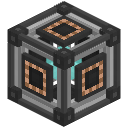
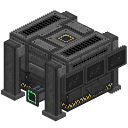

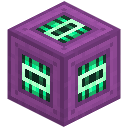
- 1 × QIO Importer
- 1 × Teleportation Core
- 1 × QIO Exporter
- 2 × Quantum Entangloporter
- 1 × Digital Miner
- 2 × Ultimate Control Circuit
- 1 × Ultimate Induction Cell
- I: QIO Importer
- T: Teleportation Core
- X: QIO Exporter
- Q (×2): Quantum Entangloporter
- D: Digital Miner
- U (×2): Ultimate Control Circuit
- C: Ultimate Induction Cell
This is not an ordinary shaped recipe: crafting it carries the Digital Miner’s upgrades, stored items, overflow storage, energy (as much as the new machine holds) and owner into the new Quantum Digital Miner, the same way Mekanism’s own recipes carry a machine’s contents to its next tier. The Digital Miner’s filters and mining settings are not copied: set them again on the new machine (the Digital Miner Companion can Pull them from the old machine before you craft and Push them to the new one).
Ingredients that are already configured never block the craft, in a crafting table or in the Crafting Terminal of Applied Energistics 2. The upgrades of the Digital Miner go into the new machine; the upgrades of the other ingredients (a QIO Importer with Speed Upgrades, an Entangloporter with an Anchor Upgrade) join them when they fit within the maximum, and otherwise come back as upgrade items in the crafting result, together with any item the new machine has no room for. Nothing is lost or duplicated.
Getting started
Section titled “Getting started”- Gather the ingredients above; the Digital Miner’s upgrades and stored items travel into the new machine, its filters and settings do not.
- Craft the Quantum Digital Miner.
- Place it and give it power (its own ports, or a Quantum/QIO energy source set up later).
- Right-click it to open its screen, then click Config (or shift + right-click the machine) to open the Configuration screen: set the radius (up to 128 by default), the Y range, filters, Silk touch, Auto-eject and Auto-pull, and inverse mode: the same screen and rules as the Digital Miner.
- Optionally, pick a Quantum or QIO source for Energy, Import or Export from the Quantum link column.
- Click Start.
The interface
Section titled “The interface”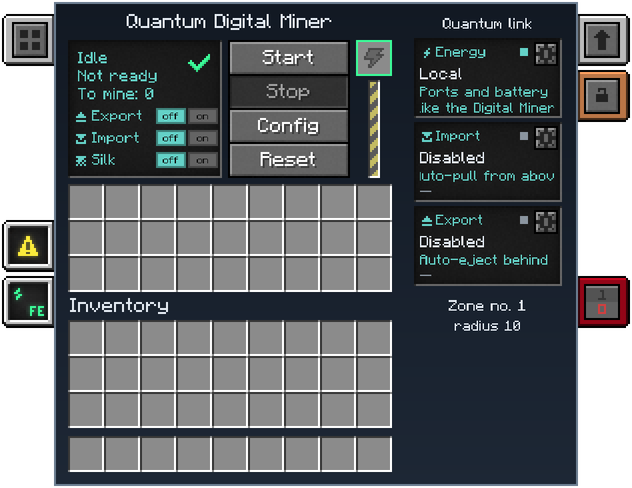
- Status screen (top left): the machine’s state (
Running,Low PowerorNot ready, or a warning such as full output or missing redstone), the search state, andTo mine: n. - Export / Import / Silk rows: horizontal OFF | ON switches for auto-eject, auto-pull and Silk touch.
- Energy bar: a vertical power bar that warns when the buffer cannot cover the next tick’s cost.
- Missing block slot: shows the replacement block the machine is waiting for, if any.
- Visuals and Energy tabs: Mekanism’s own tabs, for the zone outline in the world and the energy summary.
- Start / Stop / Config / Reset buttons, enabled or disabled exactly as on the Digital Miner’s own screen.
- Quantum link column: one card per source (Energy, Import, Export) showing its state (connected, empty, no frequency, or “like the Digital Miner”), each with a Configure button that opens Mekanism’s own frequency selector to choose Local, a named Quantum frequency, or QIO. The column also shows the current zone number and radius.
- Opening Config shows the Digital Miner’s own configuration screen. It is tall: if it does not fit your window (for example at GUI scale 3 in a 1280×720 window), lower the GUI scale. Its left panel has, top to bottom: “Filters: N”; “Block radius: N” with a field and a check button to set it, and its limits beside it (“Min 0” over “Max 128” with the default server setting); “Min Y level: N” and “Max Y level: N”, each with a field, a check button and its own “Min” and “Max” (the world’s lowest block up to the zone’s top for the minimum, the zone’s bottom up to the world’s last block for the maximum; the server clamps what you type to those same limits); the inverse mode switch; the replacement block slot (drag a block onto it, Shift-click to clear) and the button that requires it. To the right, the filter list with its scroll bar and the New filter button; a back arrow at the top left returns to the main screen.
Notifications
Section titled “Notifications”Your Quantum Digital Miner tells you, with a notification and Minecraft’s notification sound, when:
- mining is complete (“Mining finished”, or “Done in the loaded chunks only” when part of the zone was not loaded);
- mining is paused, with the reason: not enough energy, storage full, overflow items to clear, replacement block missing, placement refused, or area not loaded;
- a relocation is complete.
Each notification gives the dimension and the machine’s X, Y and Z. Only the owner receives them, and only while connected.
Beyond eight at once, the rest are counted in a single “+N more” notification. Turn them off with the client setting
notifications (see Configuration); that turns off the notification and its sound for the whole mod.
Quick filters and saved filter lists
Section titled “Quick filters and saved filter lists”The New filter window starts with two shortcuts, and only the filter list changes: radius, height, Silk Touch and every other setting stay as they are.
Ready-made ore tag filters: iron, gold, coal and redstone, plus copper, lapis, diamond, emerald, tin, lead, osmium and uranium when their tag exists. Replace the list with one, or Add it at the end; ores from other mods are included.
Save current filters under a name, then load the list on any miner with Replace or Add. Your own library, in the world or on the server: up to 32 lists of 128 filters.
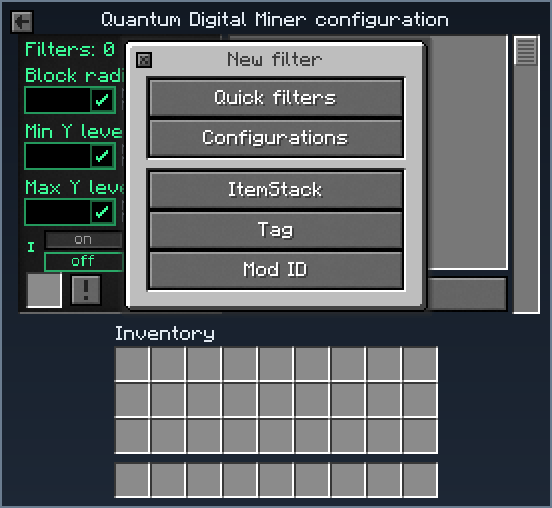
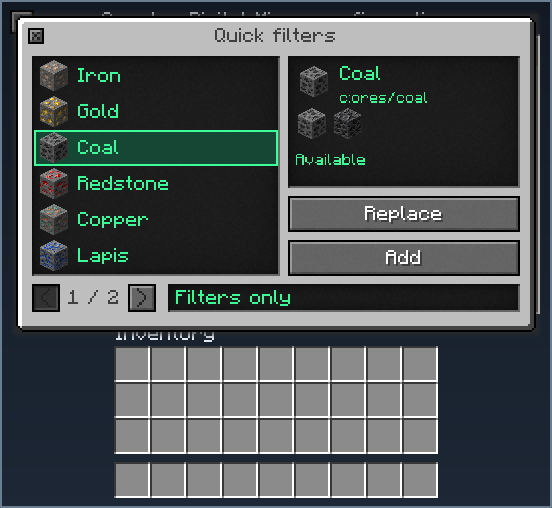
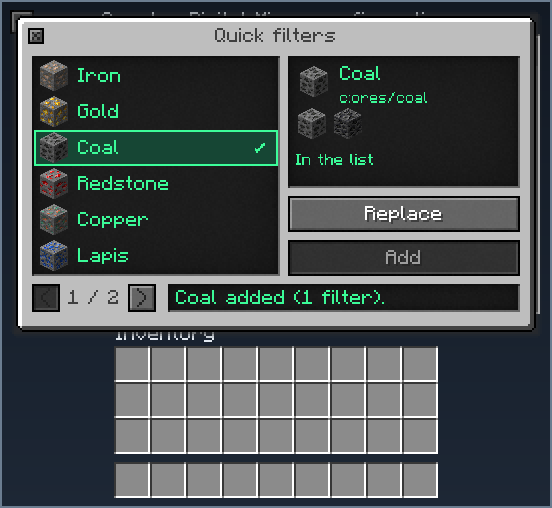
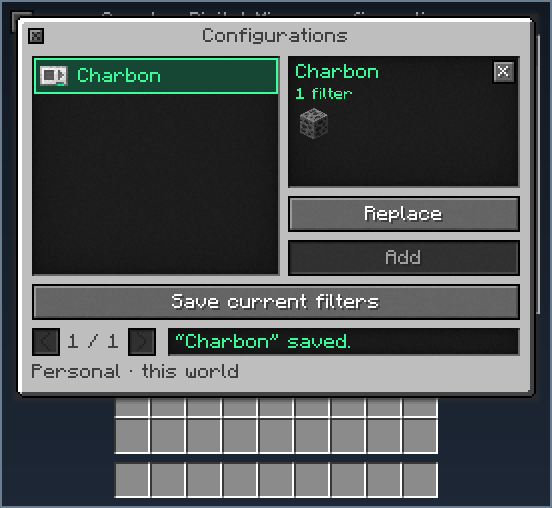
- Quick filters: a short catalogue of ore tags. Iron, gold, coal and redstone are always listed; copper, lapis, diamond,
emerald, tin, lead, osmium and uranium are listed when their common ore tag exists in the instance. Each makes an ordinary
Mekanism tag filter on the common tag (for example
c:ores/iron), so ores added by other mods are included. Replace makes the list that one filter (a confirmation asks first when the list is not empty); Add puts it at the end of the list unless a filter of that tag is already there. A tag that Mekanism’s miner blacklist excludes is shown as “Tag excluded from mining” and cannot be used; a tag missing from the instance says “Tag missing”; one already in the list says “In the list”. The world is never scanned and no chunk is loaded to do this. The filter list stops at 128 filters. - Configurations: Save current filters stores the miner’s filter list under a name, and you can load it on any miner with Replace or Add, overwrite it or delete it. Each player has their own library, in the world or on the server (the window says “Personal · this world” or “Personal · this server”): up to 32 lists of 128 filters, names up to 24 characters. A list that cannot be read is kept and not applied (“Unreadable”); one that needs a tag or mod that is missing says “Tag or mod missing”.
Automation
Section titled “Automation”- Ports, same layout as the Digital Miner: items in on top, items out through the centre of the upper rear face, energy on the bottom (also usable on the left and right), reachable at the centre of each face. Put a chest directly against the outside of that rear port and set Export to Local and Auto-eject to ON. With no Mekanism side configuration on this machine, this layout is fixed: switch a face’s role between Local, Quantum and QIO from the Quantum link column instead of Mekanism’s face editor.
- Keeps on break and re-place: filters, settings, upgrades, energy, inventory, security, redstone control and the history of finished zones all travel with the machine. Its current search does not: like the Digital Miner, it searches again after being reloaded. Its energy, QIO, import and export frequency links travel in the item only when it was the owner who broke it; broken by anyone else, or an old or forged item, the miner is placed unlinked (the source mode you chose stays), so nobody can draw on the owner’s private network.
- Chunk loading: only with an Anchor Upgrade installed, and only its own chunk and the one it is mining: see What it does above.
Configuration
Section titled “Configuration”Server config, section quantum_miner:
| Key | Default | Range | Meaning |
|---|---|---|---|
enabled | true | – | Turns searching and mining off entirely |
maxRadius | 128 | 1–128 | Largest mining radius players may set |
speedMultiplier | 8.0 (4.0 before 1.3) | 1.0–16.0 | Mining speed compared to a Digital Miner with the same Speed Upgrades |
energyMultiplier | 4.0 | 0.0–64.0 | Energy use and base storage compared to Mekanism’s Digital Miner config |
maxBlocksPerTick | 8 | 1–64 | Hard cap on blocks mined by one machine in a single tick |
maxBlocksPerGameTick | 32 | 1–1024 | Hard cap on blocks one machine mines in a whole game tick, however many times its work is run in it (a Time Overclocker runs it again and again) |
maxChecksPerTick | 512 | 16–65,536 | Hard cap on positions examined in a single tick |
searchBudgetMicros | 2,000 | 100–50,000 | Server-thread time per tick shared by every running search |
searchThreads | 1 | 1–4 | Background threads analysing chunks, shared by every Quantum Digital Miner |
searchMaxPendingChunks | 8 | 1–64 | With an Anchor Upgrade, chunks a search may load at once (short-lived, never blocking) |
verboseLogs | false | – | Extra logging for debugging |
Relocation itself (triggered from the Digital Miner Companion) has its own relocation section: see Digital
Miner Companion.
Client config (mekanismengineering-client.toml): notifications (default on) turns the miner’s notifications and their sound
off for the whole mod. The server still sends them.
Relocation safety
Section titled “Relocation safety”A relocation either completes or is undone, leaving the world as it was. If an undo itself cannot put a block back, the server stops for safety and replays its journal at the next restart, instead of silently losing the record of what was moved. This is deliberate; it has been the behaviour since 1.1.1.
Tips and troubleshooting
Section titled “Tips and troubleshooting”- Screen stuck on a warning: it only turns amber after three refreshes with nothing mined in a row: check the reason shown on the status screen (energy, full output, redstone, missing replacement block).
- Low Power: Speed Upgrades outrunning Energy Upgrades, exactly as on a Digital Miner: add Energy Upgrades, or switch its energy source to a Quantum frequency or QIO from the Quantum link column.
- Only this machine relocates: a plain Digital Miner linked to a Digital Miner Companion can be read and remote-controlled, never moved.
In-game texts
Section titled “In-game texts”What the game itself shows for this item: the description under Shift, the tooltips and the JEI information page, word for word.
Quantum Digital Miner
- Description (hold Shift)
- Endgame evolution of the Digital Miner: same filters and settings, radius up to 128, four times the mining speed, energy and items through quantum frequencies, and relocation to a fresh area with the Digital Miner Companion.
- JEI · Role
- Mines a large area with filters; once finished, it can be relocated with the Companion.
- JEI · Supply
- Energy, filters and any replacement blocks; item input on the top.
- JEI · Result
- Ores and other mined drops; item output at the back.
- JEI · Good to know
- Speed, Energy, Anchor and Stone Generator upgrades; protections and drops are kept.
Written from the mod's own wiki and data files (05759a70, 2026-11-07).Mod v1.3 for Minecraft 1.21.1 (NeoForge, Mekanism 1.21.1-10.7.19.85) and Minecraft 1.20.1 (NeoForge, Mekanism 1.20.1-10.4.16.80).Block and item pictures are drawn from the game's models and textures; Mekanism's are under the MIT licence.Not an official Minecraft product, not approved by or associated with Mojang or Microsoft.