Quantum Chargepad
Mekanism's Chargepad at endgame pace: step on it and every energy item you carry charges at once, with energy from a cable or from a quantum frequency.
 ⟲ Drag to turn
| Type | Machine (pad) |
| Added in | 0.7 (screen and quantum mode in 1.2.0) |
| Size | 1 block, a one-pixel plate you walk onto |
| Energy | 1,000,000,000 J (400,000,000 FE) stored; gives each player up to 256,000,000 J (102,400,000 FE) a tick (quantum_chargepad.energyStorage / transferRate) |
| Upgrades | None, as Mekanism’s Chargepad |
| Side configuration | Yes (Mekanism), energy only: in at the back and from below by default; in quantum mode no face takes energy |
What it does
Section titled “What it does”Stand on the pad: every item you carry that holds energy and is not full charges in the same tick, instead of one item at a time as on Mekanism’s Chargepad. That covers your worn armour, your off hand, your hot bar and your main inventory, plus Curios slots when Curios is installed. Items stored inside other items (a backpack, a shulker box) are not charged.
Each item still charges no faster than its own charge rate (a MekaSuit piece: 100,000 J a tick, more with Energy Units), your items together take no more than the pad’s transfer rate, and the pad never gives more than it holds. When its energy runs short, your worn armour charges first (head to feet), then the off hand, the selected hot-bar slot, the rest of the hot bar, the inventory, then Curios slots.
The pad lights up and gives off teal sparks while it charges. Robits standing on it are charged too, as on Mekanism’s pad.
Two modes
Section titled “Two modes”Since 1.2.0 the pad has a screen with two modes:
- Local (the default) is what the pad has always done: energy comes in by cable through the configured faces, into the pad’s own reserve. Pads from earlier versions load as local and lose nothing.
- Quantum takes the energy from a quantum (Inventory) frequency that you choose on the pad’s screen, with the same rights as the Quantum Digital Miner: a Public frequency, one of your own Private ones, or a Trusted one while its owner trusts you. In this mode the pad takes no physical energy: no face offers it any, so no cable, Energy Cube or direct insertion can fill it. Each item takes its energy from the frequency at that moment; nothing is created and nothing is lost.
- Changing the mode never converts or loses energy: what a cable left in the pad’s reserve stays there, unused while the pad is quantum, and is used again when it is local.
- A pad in quantum mode is counted by the Quantum Network Controller as a family of outputs (Quantum Chargepads), with an exact rate.
Crafting
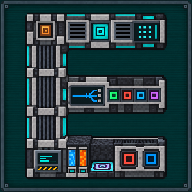
Section titled “Crafting”
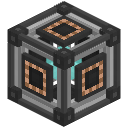

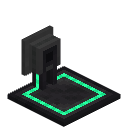
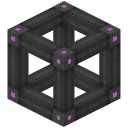
- 4 × any Ultimate Control Circuit
- 1 × Quantum Entangloporter
- 2 × any Atomic Alloy
- 1 × Chargepad
- 1 × Ultimate Energy Cube
- U: any Ultimate Control Circuit (
c:circuits/ultimate), ×4 - Q: Quantum Entangloporter, ×1
- A: any Atomic Alloy (
mekanism:alloys/atomic), ×2 - P: Chargepad (Mekanism), ×1
- X: Ultimate Energy Cube, ×1
Result: 1 Quantum Chargepad. The energy stored in the Chargepad and the Energy Cube goes into it.
Getting started
Section titled “Getting started”- Place the pad.
- Local mode: bring energy to its back or from below (a cable, an Energy Cube’s output face, a Quantum Energy Receiver). Quantum mode: right-click the pad, press Quantum, then choose a frequency with the tab on the left.
- Walk onto the plate: everything that is not full starts charging at once.
- Use a Configurator to let energy in on other faces (local mode).
The interface
Section titled “The interface”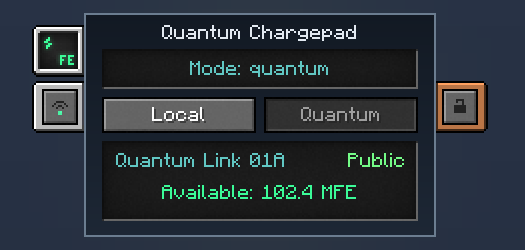
Right-click the pad to open its screen. It is deliberately small:
- two buttons, Local and Quantum; the one you are not in is the one you can press;
- Local: the line “Mode: local”, the reserve (“Reserve: …”) and “Energy comes by cable”;
- Quantum: the line “Mode: quantum” and, under it, either “No frequency linked” with “Use the tab on the left”, or the name of the frequency with its security mode and “Available: …” (the energy the frequency holds), or “Frequency has no energy”;
- the frequency tab on the left opens Mekanism’s own frequency window (the one the Quantum Energy Receivers use);
- Mekanism’s Energy tab shows the reserve in local mode and the frequency’s energy in quantum mode;
- Mekanism’s security tab says who may change the mode and the frequency. The pad charges anyone standing on it.
What the pad keeps when you break it
Section titled “What the pad keeps when you break it”Its owner, its security mode and its mode are kept in the item. The frequency is not: a pad you place always starts unlinked, so a pad broken or copied by someone else can never draw on the previous owner’s private network. A Configuration Card links the pad only to a frequency that still exists. In local mode the stored energy and the face settings are kept as before.
Automation
Section titled “Automation”Its energy faces are configured like any Mekanism machine (energy only), and only matter in local mode. Breaking it keeps its energy and its face settings in the item, and the pad drops its item when mined with a pickaxe in survival.
Configuration
Section titled “Configuration”Section quantum_chargepad of mekanismengineering-server.toml:
| Key | Default | Range | Meaning |
|---|---|---|---|
energyStorage | 1,000,000,000 J | 1 J – no limit | Energy the pad stores. |
transferRate | 256,000,000 J | 1 J – no limit | Energy it gives each player standing on it per tick, shared by all their items; each item still takes no more than its own charge rate. |
- The pad is as fast as the energy you bring it: a big stored buffer charges a first set of gear at once, then the supply sets the pace.
- Several players can stand on one pad; each gets their own share of the transfer rate.
- In quantum mode the pad is as fast as the frequency is full: it draws every tick a player is on it, and loads no chunk.
- A pad that charges nothing in quantum mode: check the line under “Mode: quantum” (“No frequency linked” or “Frequency has no energy”).
In-game texts
Section titled “In-game texts”What the game itself shows for this item: the description under Shift, the tooltips and the JEI information page, word for word.
Quantum Chargepad
- Description (hold Shift)
- Charges every energy item of the players standing on it at once, each at its own charge rate: worn armour first, then hands, hot bar and inventory. Two modes: energy by cable, or energy taken from a quantum frequency.
- JEI · Role
- Charges the items worn by players standing on the plate, and Robits.
- JEI · Supply
- Energy through the configured faces (local mode) or from a quantum frequency (quantum mode); a player or a Robit on the pad.
- JEI · Result
- Charging of compatible equipment.
- JEI · Good to know
- Each item's own rate and the energy available limit the charge.
- JEI · Good to know
- Two modes: local (energy by cable) and quantum (energy from a frequency; the pad then takes no physical energy). It charges anyone standing on it; the security tab says who may change its mode. No upgrades.
Written from the mod's own wiki and data files (05759a70, 2026-11-07).Mod v1.3 for Minecraft 1.21.1 (NeoForge, Mekanism 1.21.1-10.7.19.85) and Minecraft 1.20.1 (NeoForge, Mekanism 1.20.1-10.4.16.80).Block and item pictures are drawn from the game's models and textures; Mekanism's are under the MIT licence.Not an official Minecraft product, not approved by or associated with Mojang or Microsoft.