Precision Upgrade Controller
Stocks a factory's worth of Mekanism upgrades and fits them into every machine around it.
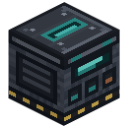 ⟲ Drag to turn
| Type | Machine |
| Size | 1 block |
| Stack size | 1 (on 1.21.1 since 1.2.1, as on 1.20.1; stacks already in a world keep their count) |
| Energy | 400 J/t while scanning or applying (upgrade_controller.energyUsage); stores 200,000 J (upgrade_controller.energyStorage) |
| Upgrades | Speed, Energy (affect only its own scan/apply speed and energy cost) |
| Side configuration | Yes (Mekanism): items and energy |
What it does
Section titled “What it does”The Controller keeps a vault of Mekanism upgrades (up to 1,024 of each type by default) and installs them automatically into every eligible machine inside a cubic zone around it, instead of you opening each machine one by one. It touches only upgrades: never a machine’s inputs, outputs, side configuration, recipes or inventory.
- The zone is a cube centred on the Controller, sized by the server setting
upgrade_controller.radius(8 blocks each way by default, so 17 × 17 × 17 total). Players cannot change it from the screen; it is shown in the world with Mekanism’s own Visuals tab, the same translucent box Mekanism draws for the Digital Miner’s zone. - The vault holds up to
vaultCapacityPerType(1,024 by default) of each of Mekanism’s seven upgrade types (Speed, Energy, Chemical, Filter, Muffling, Anchor, Stone Generator). It is filled by dropping items into the Deposit slot, or by piping upgrade items into any face configured as an item input. If Mekanism Extras (or another addon) adds upgrade types, they appear in the vault too. - One upgrade at a time. The screen always shows one upgrade, the one selected in the vault. The numbers you set, Set all machines to max and Apply all concern that upgrade only. Applying Speed never moves your Energy Upgrades, even if you switch to another upgrade while it works.
- Scan reads the block entities in the zone’s chunks and groups the machines you can access by block type; it needs the zone’s chunks to be loaded, and says how many aren’t.
- Per machine type, you include or exclude it, and set how many of the shown upgrade it should carry: a number you dial with − / +, or Max on that row, which sets the upgrade’s ceiling (8 for Speed, Energy and Chemical, 1 for the others) once.
- Apply moves only the difference for the shown upgrade: what is missing goes in from the vault, what is in excess comes back out, re-checking each machine right before touching it, a few upgrades per tick. Two Controllers never work the same machine at the same time: each reserves the machines it still needs to visit until it is done or gone.
- Removals (upgrades an Apply would take out of a machine) are shown in red wherever they appear (the machine rows’ lines, the summary), and the Apply button itself turns red with a tooltip listing the upgrade that comes out and how many, that they go back to the vault, and any stored energy that would be lost. Taking Energy Upgrades out clips the machine’s stored energy down to its new (lower) maximum, exactly as if you had pulled them by hand; that loss is shown before you press Apply.
- A machine you aren’t allowed to touch, by Mekanism’s own security, is never indexed or modified.
Crafting
Section titled “Crafting”



- 4 × Infused Alloy
- 2 × Advanced Control Circuit
- 2 × Basic Logistical Transporter
- 1 × Steel Casing
Getting started
Section titled “Getting started”- Craft the Controller.
- Place it roughly at the centre of the factory you want to manage. Every machine you want it to reach must sit
inside its cube (8 blocks each way by default; check
upgrade_controller.radiusif you’re not sure). - Power it: connect a cable to an energy-configured face, or put a battery in its energy slot. An unpowered Controller waits and says so on screen.
- Fill the vault: drop upgrade items into the Deposit slot, or pipe them into any face set as an item input.
- Press Scan and wait for it to finish; the screen shows how many chunks are read.
- Pick an upgrade in the vault, include the machine types you want managed, and set how many of that upgrade each type should carry (or press that row’s Max).
- Press Apply. A red Apply button means this run will also pull upgrades out of some machines: read its tooltip first if that’s not what you expect.
The interface
Section titled “The interface”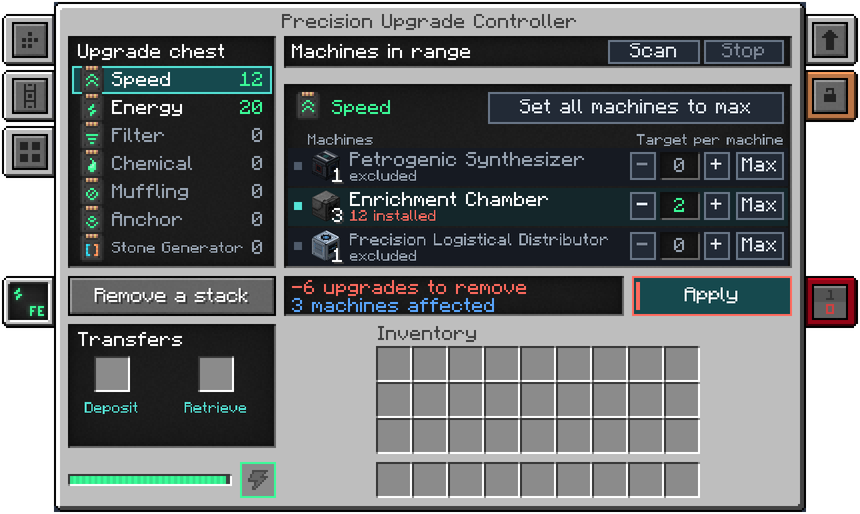
The screen is tall: if it does not fit your window (for example at GUI scale 3 in a 1280×720 window), lower the GUI scale.
- Upgrade chest (left): one line per upgrade, with its icon, its name and how many the vault holds (grey at 0). Click a line to select that upgrade; the selected line is outlined in teal. Shift-click a line to put a stack of it into your inventory. The Remove a stack button under the chest does the same for the selected upgrade; if your inventory is full, the stack goes to the Retrieve slot instead.
- Drop-down list for other mods’ upgrades. When Mekanism Extras (or another addon) adds upgrade types, a button such as +3 ▼ (the number is how many are added) sits on the chest’s title line. It opens those upgrades in a list over the chest (“Upgrades added by other mods”); click one to show it, click anywhere else to close the list. Shift-click a line of the list to take a stack out, as on the chest. Without such an addon there is no button.
- Machines in range (top middle): the Scan and Stop buttons. Scan uses energy while it works; Stop ends a scan or an Apply under way, and nothing is ever left half-moved.
- The shown upgrade (middle): its icon and name, then Set all machines to max, which sets the most it can hold for every included machine type that takes this upgrade. The columns are Machines and Target per machine.
- One row per machine type (three at a time; scroll with the mouse wheel, and a counter such as “1–3 / 7” shows where you are): a small square to include or exclude the type; the machine’s real block as its icon with the number of machines of that type found by the last scan; its name; “N installed” (or “excluded”); and the target with − and + and Max. An excluded row keeps its icon in colour and greys its words and numbers. A machine type left in the old MAX mode (from an older save) shows the upgrade’s ceiling until you change it with − / + or Max.
- Summary (two lines under the rows, with the full detail on hover): what Apply would do for the shown upgrade, in green for what it installs (“+N upgrades to install”) and in red for what it removes (“−N upgrades to remove”), then how many machines it touches (“N machines affected”). When something stands in the way, that line takes its place: “No power: the Controller is waiting”, “Stopped by redstone: the Controller is waiting”, “Press Scan to find the machines around”, “No machine found within N blocks”, “N missing: the vault cannot cover every machine”, “N chunks not loaded: the scan is partial”, “Last Apply: X of Y upgrades moved” and so on. When Energy Upgrades would come out, “Stored energy lost: up to …” appears.
- Apply: runs the plan for the shown upgrade. It turns red when it removes upgrades.
- Transfers (bottom left): the Deposit slot (upgrades in) and the Retrieve slot (what the take button could not put in your inventory), the energy bar and the charge slot for a battery.
- Mekanism’s Visuals tab, below the face-configuration tabs, draws the working cube in the world.
Automation
Section titled “Automation”- Side configuration works like any Mekanism machine: item faces (upgrades in, upgrades out) and one energy face. By default every face accepts upgrades both ways and energy in; turn on auto-eject from the face-configuration tab if you want the vault’s overflow pushed out automatically.
- A logistical transporter piping upgrade items into any face set as an item input fills the vault the same way the Deposit slot does.
- The zone’s radius is a server-wide setting, not a per-block one.
- Two Controllers can safely cover overlapping zones: while one works a machine, the other leaves it alone, and a Controller that is gone, unloaded or stopped never blocks anything.
- Breaking the block keeps the vault, per-type settings, energy and redstone mode in the dropped item. When a player breaks it, the item goes straight into their inventory; only what the inventory can’t hold drops.
Configuration
Section titled “Configuration”Section upgrade_controller of mekanismengineering-server.toml:
| Key | Default | Range | Meaning |
|---|---|---|---|
vaultCapacityPerType | 1024 | 1 to 65,536 | Upgrades of one type the vault can hold. |
radius | 8 | 1 to 64 | Cubic radius every Controller works over, in blocks. Players cannot change it; the Visuals tab shows the zone. |
energyUsage | 400 J/t | 0 to max | Energy drawn per tick while scanning or moving upgrades, before Speed/Energy Upgrades. |
energyStorage | 200,000 J | 1 to max | Energy the Controller stores. |
Tips and troubleshooting
Section titled “Tips and troubleshooting”- “Scanning: N / M chunks” that never finishes almost always means no power: check the energy bar and the “No power” line in the summary.
- A machine type that still asks for more than you set, with the vault tooltip saying “A kind still in the old MAX mode wants every upgrade it accepts”, comes from a save made before the per-row Max existed: such a type wants the ceiling of every upgrade it accepts, Anchor and Stone Generator included. Use − / + or Max on its row to make its target an explicit number.
- After an Apply, the “Last Apply” result you read is that of the most recent Apply, whichever upgrade it was for, even if you have since selected another upgrade with nothing to do.
In-game texts
Section titled “In-game texts”What the game itself shows for this item: the description under Shift, the tooltips and the JEI information page, word for word.
Precision Upgrade Controller
- Description (hold Shift)
- Holds a factory's worth of Mekanism upgrades and puts them into the machines around it: scan the cube, pick the kinds of machine to manage, say how many of each upgrade they should carry, and apply. Accepts upgrades from a logistical transporter on any face (set in its side configuration), and keeps its vault when broken.
- JEI · Role
- Installs or removes upgrades on the allowed machines inside the controller's zone.
- JEI · Supply
- Stored upgrades and energy; choose a category in the interface.
- JEI · Result
- Upgrades installed on, or removed from, the machines in reach.
- JEI · Good to know
- Apply and Set all machines to max only affect the category shown.
- JEI · Good to know
- Machines you excluded stay excluded. Categories not shown are kept.
Written from the mod's own wiki and data files (05759a70, 2026-11-07).Mod v1.3 for Minecraft 1.21.1 (NeoForge, Mekanism 1.21.1-10.7.19.85) and Minecraft 1.20.1 (NeoForge, Mekanism 1.20.1-10.4.16.80).Block and item pictures are drawn from the game's models and textures; Mekanism's are under the MIT licence.Not an official Minecraft product, not approved by or associated with Mojang or Microsoft.