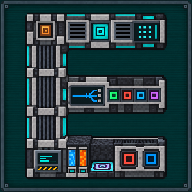
Quantum Energy Receiver
Draws energy from an existing Quantum frequency into the machine on its mounting side.
 ⟲ Drag to turn
| Type | Machine (face-mounted plate) |
| Added in | 0.6 |
| Size | Thin plate (4 px), fixed to one face of another block |
| Energy | Delivers up to its tier’s rate (follows Mekanism’s Energy Cube tier output); stores none of its own beyond a small in-transit reserve |
| Upgrades | None |
| Side configuration | Yes (Mekanism), but only the one face it’s mounted against is ever active |
What it does
Section titled “What it does”A plate that sticks to any face of another block, top, bottom, or a side, and feeds that block energy drawn from an existing Quantum frequency: the same Inventory frequencies Mekanism’s own Quantum Entangloporters share. It only moves energy: no items, fluids, chemicals or heat, and it never sends energy back onto the frequency. Four tiers exist (Basic, Advanced, Elite, Ultimate); only the maximum transfer rate changes between them, matching each tier’s Energy Cube throughput.
Tier and maximum rate:
| Tier | Rate (Mekanism default) |
|---|---|
| Basic | 4,000 J/t (Basic Energy Cube) |
| Advanced | 16,000 J/t (Advanced Energy Cube) |
| Elite | 64,000 J/t (Elite Energy Cube) |
| Ultimate | 256,000 J/t (Ultimate Energy Cube) |
Crafting
Section titled “Crafting”(The Receivers’ tiers are also families in the Quantum Network Controller: Basic, Advanced, Elite and Ultimate Receivers.)
Basic:






- 4 × any Redstone Dust
- 1 × Teleportation Core
- 2 × Energy Tablet
- 1 × Basic Energy Cube
- 1 × any Iron Ingot
Advanced, Elite and Ultimate use the same pattern, crafted with the previous tier’s Receiver so its data (faces, redstone mode, in-transit energy) carries forward; its frequency does not (see Automation):
Advanced Quantum Energy Receiver





- 4 × any Infused Alloy
- 1 × Basic Quantum Energy Receiver
- 2 × any Advanced Control Circuit
- 1 × Advanced Energy Cube
- 1 × any Osmium Ingot
Elite Quantum Energy Receiver





- 4 × any Reinforced Alloy
- 1 × Advanced Quantum Energy Receiver
- 2 × any Elite Control Circuit
- 1 × Elite Energy Cube
- 1 × any Gold Ingot
Ultimate Quantum Energy Receiver




- 4 × any Atomic Alloy
- 1 × Elite Quantum Energy Receiver
- 2 × any Ultimate Control Circuit
- 1 × Ultimate Energy Cube
- 1 × any Diamond
| Tier | A (alloy, ×4) | R (previous tier, ×1) | C (circuit, ×2) | X (Energy Cube, ×1) | M (metal, ×1) |
|---|---|---|---|---|---|
| Advanced | Infused Alloy | Basic Quantum Energy Receiver | Advanced Control Circuit | Advanced Energy Cube | Osmium Ingot |
| Elite | Reinforced Alloy | Advanced Quantum Energy Receiver | Elite Control Circuit | Elite Energy Cube | Gold Ingot |
| Ultimate | Atomic Alloy | Elite Quantum Energy Receiver | Ultimate Control Circuit | Ultimate Energy Cube | Diamond |
(C and M use tagged ingredients: any circuit or metal of the matching tier.)
Getting started
Section titled “Getting started”- Craft a Basic Quantum Energy Receiver (or a higher tier, once you’ve upgraded one through the crafting grid).
- With the Receiver in hand, right-click any face of the machine you want to power: it sticks to that face like a plate.
- Right-click the Receiver itself to open its screen.
- Open the Frequency tab and link an Inventory frequency you can access (Public, Trusted, or Private): the same frequency your Quantum Entangloporters share. The tab opens Mekanism’s own frequency window, so you can also create a frequency there, or delete one of yours.
- Once the frequency holds energy and the machine behind the plate can accept it, the Receiver starts delivering automatically, up to its tier’s rate.
- Use the Faces tab (or a Configurator) if you want to move the plate to a different face of the same block.
The interface
Section titled “The interface”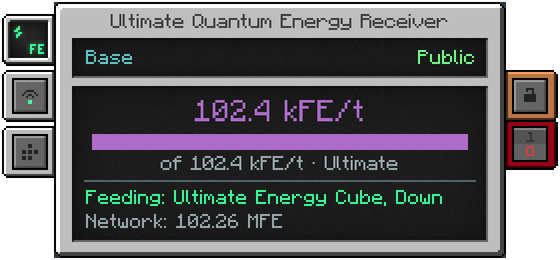
- Top screen: the linked frequency’s name (or “No frequency linked”), with its security mode (Public / Trusted / Private) on the right.
- Centre screen: the delivered rate in large text, a bar showing that rate against the tier’s maximum (“of X/t · tier name” underneath), a colour-coded status line, and the frequency’s total stored energy at the bottom.
- Energy tab (left): stored energy on the frequency, and the delivered rate.
- Frequency tab (left): Mekanism’s own frequency window, the same as on the Quantum Digital Miner and the Quantum Chargepad: the Public / Trusted / Private filters, a scrollable list, and the controls to link, create and delete a frequency (there is no separate Unlink button). A frequency whose radioactive stock still holds something cannot be deleted from any block of this mod.
- Faces tab (left): Mekanism’s own six-world-face cross; each face button shows the neighbouring block, and clicking one moves the plate there.
- Status line covers every reason nothing is flowing, never a silent wait: “Machine connected” (green, with the fed block’s name and face), “No energy target” (nothing energy-accepting behind the plate, or no face chosen), “No frequency linked”, “Stopped by redstone control”, or “In transit: …” (a refused remainder being retried).
Automation
Section titled “Automation”- Side configuration exists, Mekanism-style, but only ever carries one Energy-type face: the one against the fed block. Picking a different face in the Faces window, or with a Configurator, physically relocates the plate: it always feeds whatever it’s touching.
- No item, fluid, chemical or heat automation: this block moves energy only.
- Breaking it keeps its chosen face, redstone mode, and any energy caught mid-transfer in the dropped item. It never keeps its frequency, whoever breaks it: a Receiver you place always starts unlinked and you choose the frequency on its screen, so a Receiver broken or copied by someone else cannot draw on the previous owner’s private network. A Configuration Card links it only to a frequency that still exists; it never recreates a deleted one.
Configuration
Section titled “Configuration”No dedicated mekanismengineering-server.toml section. Each tier’s maximum rate follows Mekanism’s own Energy Cube
tier output configuration, so a modpack that changes Energy Cube output changes matching Receivers too.
Tips and troubleshooting
Section titled “Tips and troubleshooting”- No frequency linked: open the Frequency tab and link one, or create one there. A Receiver always starts unlinked after it has been placed or crafted.
- No energy target: the plate’s face doesn’t currently have an energy-accepting block behind it (or the chunk isn’t loaded); check what it’s stuck to.
- Stopped by redstone control: check the Receiver’s redstone-mode tab.
- In transit: …: the target briefly refused some energy; the Receiver retries delivering it (to the source frequency first if that’s still possible, otherwise straight to the target) instead of losing it. If the frequency’s security mode changes while energy is in transit, the energy goes back to the frequency, not to the machine.
- Only energy moves through this block; it will never show item, fluid, chemical or heat figures.
- With Jade or WTHIT, a Receiver shows its name and the frequency you are allowed to use, and no energy bar (see JEI, Jade and WTHIT).
In-game texts
Section titled “In-game texts”What the game itself shows for these items: the description under Shift, the tooltips and the JEI information page, word for word.
Basic Quantum Energy Receiver
- JEI · Role
- Transfers the energy of a Quantum frequency to an adjacent machine.
- JEI · Supply
- An existing Quantum frequency that you can access and that holds energy.
- JEI · Result
- Energy to the single configured output face.
- JEI · Good to know
- No upgrades. Creating a frequency from this selector is possible, as on any Mekanism machine.
- JEI · Good to know
- No transfer if redstone blocks it, if the frequency is invalid or if there is no destination.
Advanced Quantum Energy Receiver
- JEI · Role
- Transfers the energy of a Quantum frequency to an adjacent machine.
- JEI · Supply
- An existing Quantum frequency that you can access and that holds energy.
- JEI · Result
- Energy to the single configured output face.
- JEI · Good to know
- No upgrades. Creating a frequency from this selector is possible, as on any Mekanism machine.
- JEI · Good to know
- No transfer if redstone blocks it, if the frequency is invalid or if there is no destination.
Elite Quantum Energy Receiver
- JEI · Role
- Transfers the energy of a Quantum frequency to an adjacent machine.
- JEI · Supply
- An existing Quantum frequency that you can access and that holds energy.
- JEI · Result
- Energy to the single configured output face.
- JEI · Good to know
- No upgrades. Creating a frequency from this selector is possible, as on any Mekanism machine.
- JEI · Good to know
- No transfer if redstone blocks it, if the frequency is invalid or if there is no destination.
Ultimate Quantum Energy Receiver
- JEI · Role
- Transfers the energy of a Quantum frequency to an adjacent machine.
- JEI · Supply
- An existing Quantum frequency that you can access and that holds energy.
- JEI · Result
- Energy to the single configured output face.
- JEI · Good to know
- No upgrades. Creating a frequency from this selector is possible, as on any Mekanism machine.
- JEI · Good to know
- No transfer if redstone blocks it, if the frequency is invalid or if there is no destination.
Written from the mod's own wiki and data files (05759a70, 2026-11-07).Mod v1.3 for Minecraft 1.21.1 (NeoForge, Mekanism 1.21.1-10.7.19.85) and Minecraft 1.20.1 (NeoForge, Mekanism 1.20.1-10.4.16.80).Block and item pictures are drawn from the game's models and textures; Mekanism's are under the MIT licence.Not an official Minecraft product, not approved by or associated with Mojang or Microsoft.