Quantum Portable Teleporter
Your own Portable Teleporter, grown up: jump to a Mekanism Teleporter, to coordinates, or to a random safe place.

| Type | Tool |
| Added in | 0.7 |
| Size | Held item, does not stack |
| Energy | Its own battery: quantum_teleporter.energyCapacity (1,000,000,000 J / 400,000,000 FE by default, 1 GJ), charged at up to quantum_teleporter.chargeRate (5,000,000 J/t / 2,000,000 FE/t) from its own screen or any Mekanism charger |
| Upgrades | None, it is a tool, not a machine |
| Side configuration | No, it is an item, not a block |
What it does
Section titled “What it does”Right-click the Quantum Portable Teleporter, in either hand, to open its screen. It carries its own battery and jumps you three ways, chosen with the buttons at the top of the screen:
- Teleporter: jump to a Mekanism Teleporter tuned to one of your Teleporter frequencies (Public, Trusted or Private, with Mekanism’s own security). Pick a frequency from the list; once a Teleporter is active on it, Teleport jumps straight there, with no separate check. Costs 1 % of the full battery.
- Coordinates: type X, Y, Z (or click Here for where you stand) in a chosen dimension, optionally Surface to land on the highest ground instead of a Y you pick, then Check. The server loads that one place, confirms it is safe (or moves you to the nearest safe spot) and shows the real arrival before you pay anything. Costs 50 % of the full battery.
- Random: Search a safe place somewhere between 1,000 and 8,000 blocks away in your current dimension. Obviously bad spots (ocean, void) are ruled out without loading anything; only the one promising chunk found is loaded, briefly, to confirm it is safe. Searching is free: only the jump itself costs energy, 25 % of the full battery.
Energy is only ever taken at the moment you actually jump: checking a destination or searching never costs anything, even if you never teleport. Creative players jump for free. A short cooldown follows any jump before you can jump again, and random search has its own cooldown between searches.
The teleporter keeps one last destination: what you chose, or, after a random jump, the place it landed on:
- after a jump to coordinates, the dimension and the coordinates you typed (and whether Surface was on);
- after a jump to a Teleporter, the frequency you jumped to (a frequency stays a frequency);
- after a random jump, the dimension and coordinates of the place you landed on (Surface off), so the side panel never keeps showing an older frequency; Use again then fills the Coordinates tab with them.
The two never exist together: a jump to coordinates forgets the frequency and the other way round. The last destination is shown apart on the side of the screen and named in the item’s tooltip. Use again puts back what was chosen: it switches to Teleporter mode and selects the frequency, or to Coordinates mode and refills the dimension, the fields and Surface. It never teleports by itself: press Teleport when you are ready (a coordinates destination still needs its Check). A refused jump leaves the last destination as it was.
Like any Mekanism item it has its own security (Public, Trusted or Private, set from its Security tab); a Private one only opens and jumps for its owner.
Crafting
Section titled “Crafting”





- 2 × any Antimatter Pellet
- 1 × any Ultimate Control Circuit
- 2 × Teleportation Core
- 1 × Portable Teleporter
- 2 × any Atomic Alloy
- 1 × Quantum Entangloporter
- H (×2): any Pellet of Antimatter (
c:pellets/antimatter) - U: any Ultimate Control Circuit (
c:circuits/ultimate) - T (×2): Teleportation Core
- P: Portable Teleporter
- A (×2): any Atomic Alloy (
mekanism:alloys/atomic) - Q: Quantum Entangloporter
Result: 1 Quantum Portable Teleporter.
This is a special crafting recipe: the Portable Teleporter at the centre keeps its stored energy and its tuned frequency, both carried over into the new Quantum Portable Teleporter, so craft it with an already-charged, already-tuned Portable Teleporter to save a step.
Getting started
Section titled “Getting started”- Craft the recipe above (see Crafting): an already-tuned, already-charged Portable Teleporter keeps its frequency and energy in the result, but a fresh one works too.
- Right-click the Quantum Portable Teleporter, in either hand, to open its screen.
- Charge it: put an Energy Cube, a battery or any Mekanism energy item in the slot below the power bar, or charge it beforehand in any Mekanism charger or energy cube like any other Mekanism energy item.
- Pick a mode at the top: Teleporter to jump to one of your existing Teleporter frequencies, Coordinates to type a destination and Check it, or Random to Search a safe place 1,000 to 8,000 blocks away.
- Once the status line shows a safe, affordable destination, click Teleport.
The interface
Section titled “The interface”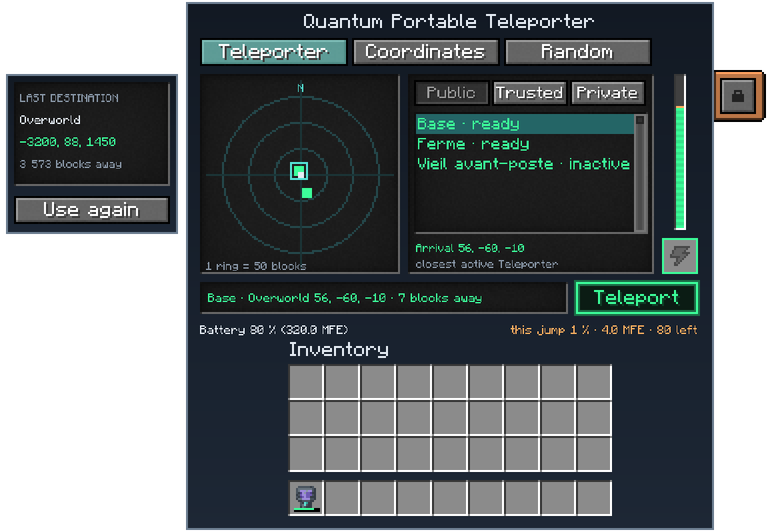
- Mode buttons (top): Teleporter, Coordinates, Random; switching mode cancels whatever the other mode was checking or searching, at no cost.
- Radar (left): you at the centre, north up, rings marked in blocks; a green dot is a confirmed or selected destination, amber a coordinate destination not yet checked, red a random try that was turned down.
- Panel (middle), by mode:
- Teleporter: Public / Trusted / Private filters over your list of Teleporter frequencies, each named with “ready” or “inactive”; picking one selects it exactly as Mekanism’s own frequency list does. Below the list: the arrival and “closest active Teleporter”, or why not.
- Coordinates: a dimension button that opens a drop-down list of the dimensions (five rows, a scroll bar and the mouse wheel for more; click a row to choose it, Esc or a click elsewhere closes the list unchanged), X/Y/Z fields, Here to fill your own position, Surface to search the highest ground instead of a fixed Y, and Check.
- Random: Search / Search again, the configured distance range, and while searching or once a place is found: the try it found at, the biome and coordinates, the distance, and a tally of rejected tries by reason (ocean, lava, void, other).
- Energy bar (right): Mekanism’s own vertical power bar, with the current jump’s cost shown as an amber band on top of the charge, and the charging slot underneath it.
- Status line and Teleport button: the current state or the reason a jump is refused, in plain language, and the green Teleport button, active only once a destination is ready and affordable.
- Battery and cost readout (bottom): stored energy as a percentage and in energy units on the left; this jump’s cost as a percentage, its energy cost, and how many more jumps like it the battery can still pay for, on the right.
- Last destination (side panel, titled “LAST DESTINATION”): for coordinates, the dimension, the coordinates and how far they are from where you stand; for a Teleporter, “Frequency” with its name and security mode; “None yet” before the first jump; and the Use again button.
Automation
Section titled “Automation”Not automatable, it is a hand tool, but:
- It charges like any Mekanism energy item, in chargers and energy cubes, as well as from its own screen.
- Its frequency, its stored energy, its security settings and its last destination (coordinates or Teleporter frequency) all live in the item itself, so they survive being stored, moved between inventories, or crafted into (see Crafting above).
Configuration
Section titled “Configuration”Section quantum_teleporter of mekanismengineering-server.toml:
| Key | Default | Range | Meaning |
|---|---|---|---|
enabled | true | – | Allows jumps; off, the item still charges but refuses every jump. |
energyCapacity | 1,000,000,000 J (1 GJ) | 1 J – no limit | Energy the teleporter stores. |
chargeRate | 5,000,000 J/t | 1 J/t – no limit | Energy it accepts per tick while charging. |
costTeleporterPercent | 1.0 | 0–100 | A jump to a Mekanism Teleporter, in percent of the full battery. |
costCoordinatesPercent | 50.0 | 0–100 | A jump to checked coordinates, in percent of the full battery. |
costRandomPercent | 25.0 | 0–100 | A jump to a random safe place, in percent of the full battery. |
randomMinDistance | 1,000 | 16–1,000,000 | Nearest a random destination can be, in blocks from you. |
randomMaxDistance | 8,000 | 16–1,000,000 | Farthest a random destination can be, in blocks from you. |
randomTries | 8 | 1–32 | Places tried by one random search before it gives up, at no cost; a search started again before its cooldown is over carries on with the tries already spent. |
searchCooldownTicks | 160 | 0–12,000 | Ticks between two random searches. |
jumpCooldownTicks | 20 | 0–12,000 | Ticks after a jump before the same player can jump again. |
maxConcurrentChecks | 2 | 1–64 | Destination chunks the whole server may load for checks at once. |
destinationHoldTicks | 200 | 20–1,200 | Ticks a checked destination stays loaded, waiting for the jump. |
blockedDimensions | none | – | Dimensions the teleporter never jumps to or from, as ids (e.g. minecraft:the_end). |
allowCoordinates | true | – | Off, the Coordinates tab is greyed out and refuses every check and jump, at no cost. |
allowRandom | true | – | Off, the Random tab is greyed out and refuses every search, at no cost. |
coordinateAndRandomBlockedDimensions | none | – | Dimensions the Coordinates and Random tabs cannot be used from (the one the player stands in; the destination does not matter). Teleporters always work. |
If randomMaxDistance is set below randomMinDistance, both ends of the search ring use the minimum distance. The
radar shows that effective range.
A tab the server has closed is greyed out in the screen; hovering it shows why. The server checks the settings again at the check and at the jump, so a change made between the two stops the jump without taking any energy.
Tips and troubleshooting
Section titled “Tips and troubleshooting”- A Teleporter-mode jump needs no Check: as soon as a frequency shows “ready”, Teleport works. It shows “inactive” instead when Mekanism has no loaded Teleporter on that frequency right now.
- The Teleporter list only shows frequencies that already exist; to reach a new one, tune it from a placed Mekanism Teleporter or an ordinary Portable Teleporter first, or start from an already-tuned Portable Teleporter when you craft this item.
- “Use again” only puts your last choice back and never teleports: after a coordinates destination, click Check before Teleport becomes active again, since the ground there may have changed since your last visit.
- A checked or found destination stays reserved for you for a limited time (
destinationHoldTicks, 10 seconds by default); wait too long and it expires: check or search again. - A blocked dimension stops jumps both into and out of it: a server that blocks the End refuses a jump that starts there too, not only one that targets it.
- “Too close to the world border”: a coordinates check needs to land a margin inside the world border.
- “The server is checking other places”: only a couple of destination checks run across the whole server at
once (
maxConcurrentChecks); wait a moment and try again. - Random search never costs energy, however many tries it takes. Only the final jump does, so search again freely if you do not like where it found. Cancelling a search and starting it again right away does not start the count over: the tries already spent still count until the search cooldown is over, including if you disconnect and reconnect during that time.
- Check clicked twice within half a second: the newest check is the one answered, at most half a second later.
- Known limit: the Teleporter list holds at most 256 frequencies, public ones first. On a server with more than 256 public Teleporter frequencies, your private and trusted ones can be left out of the list.
In-game texts
Section titled “In-game texts”What the game itself shows for this item: the description under Shift, the tooltips and the JEI information page, word for word.
Quantum Portable Teleporter
- JEI · Role
- Goes to a Mekanism Teleporter, to checked coordinates or to a random safe place.
- JEI · Supply
- Energy; an accessible frequency, coordinates or a random destination.
- JEI · Result
- Teleportation to a checked destination; the last destination is remembered.
Written from the mod's own wiki and data files (05759a70, 2026-11-07).Mod v1.3 for Minecraft 1.21.1 (NeoForge, Mekanism 1.21.1-10.7.19.85) and Minecraft 1.20.1 (NeoForge, Mekanism 1.20.1-10.4.16.80).Block and item pictures are drawn from the game's models and textures; Mekanism's are under the MIT licence.Not an official Minecraft product, not approved by or associated with Mojang or Microsoft.