Engineering’s first multiblock has arrived. The Quantum Ore Refinery runs Mekanism’s whole ore-processing chain, from smelting to dissolution and crystallization, inside one structure that you build, watch light up and tune from a single screen. Beside it, the Quantum Digital Miner gets quick filters and saved filter lists: one click to mine iron, gold, diamond and more. Around them, 1.2 brings a pocket Network Tablet, a Chargepad that draws from the quantum network, miner notifications you cannot miss, server commands, a reworked Radioactive Quantum Entangloporter, blue Quantum screens and new textures across the mod, and a long list of fixes.
✓Worlds from 1.1.1 open unchanged: new data is added beside the old, never in its place.
The level says how many items one ore makes, exactly as Mekanism’s own chains do: x1 smelts it, x2 enriches it first, x3 adds purification with oxygen, x4 adds injection with hydrogen chloride, x5 dissolves, washes and crystallizes it with sulfuric acid and water. An iron ore gives 1, 2, 3, 4 or 5 ingots; other ores follow their own Mekanism ratios.
x1Smelts it
x2Enriches it first
x3Adds purification with oxygen
x4Adds injection with hydrogen chloride
x5Dissolves, washes and crystallizes it with sulfuric acid and water
Iron ingots from one iron ore at each level, with the processing module each level adds.
It uses Mekanism’s recipes, not its own. Every step reads the recipe of the item in front of it, so what a modpack changes in Mekanism changes the refinery with it. Ores, raw ores and raw blocks go in (including the raw silver block of Mekanism: More Machine and the raw naquadah block of Mekanism Extras), and so do the ores of other mods that Mekanism can process. The tag mekanismengineering:refinery_ores lists what goes in, and a data pack can change it.
Whole stacks at a time. A job works a stack of up to 64 ores. The x1 refines a whole stack in a single tick; the higher levels take longer, because they give more.
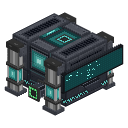
Each of the structure’s eight accelerator places that holds an Ore Refinery Accelerator shortens the job. With all eight, the x2 takes 1 tick, the x3 2, the x4 3 and the x5 4:
Accelerators
0
1
2
3
4
5
6
7
8
x2 (ticks per job)
50
31
19
12
7
4
3
2
1
x3
100
61
38
23
14
9
5
3
2
x4
150
92
56
35
21
13
8
5
3
x5
200
123
75
46
28
17
11
7
4
Same energy at every level. An ore costs what it costs in an Enrichment Chamber, whatever the level and the speed: you pay for the ore, not for the speed.
Four tanks that keep up with a Quantum Digital Miner
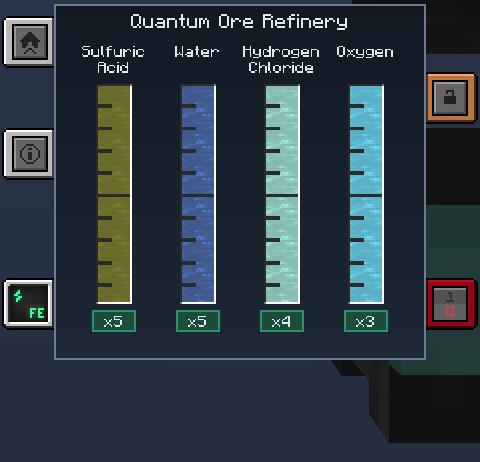
3,000,000 mB of water, 600,000 mB of hydrogen chloride, 600,000 mB of oxygen and 120,000 mB of sulfuric acid. A job takes what its steps use in Mekanism (an iron ore at x5 takes 200 mB of sulfuric acid, 5,000 mB of water, 1,000 mB of hydrogen chloride and 1,000 mB of oxygen), all at once with the products, or nothing at all.
3,000,000 mBwaterx5 iron ore: 5,000 mB
600,000 mBhydrogen chloridex5 iron ore: 1,000 mB
600,000 mBoxygenx5 iron ore: 1,000 mB
120,000 mBsulfuric acidx5 iron ore: 200 mB
What one iron ore at x5 takes from each tank.
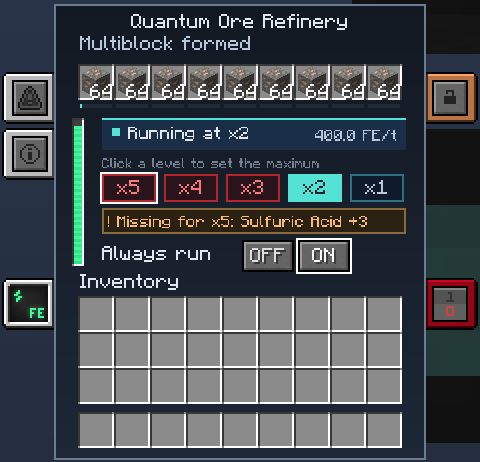
You choose how far it goes. Click a level on the Home screen to set the highest level the refinery will use. With Always run off, it waits for that level; with it on, it works at the best level your tanks cover, and never below x2 unless you chose x1. When the tanks only cover part of a stack, a job takes as many ores as they cover and the rest of the stack waits for the next job, instead of stalling or dropping a level for the whole stack.
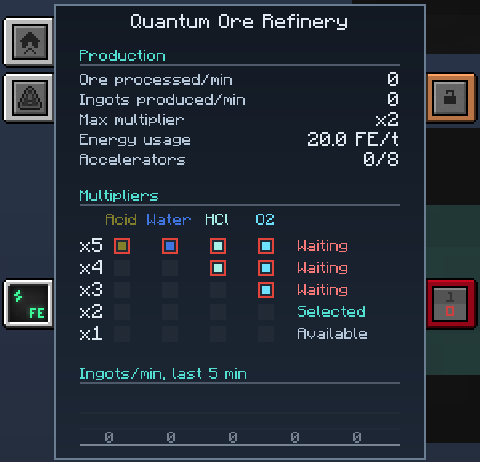
Home shows the status, the five levels (ready, waiting for a resource, working), the energy bar, the nine ore slots and the Always run buttons. Buffers shows four large gauges and the level each one unlocks. Stats shows the work in progress, level by level which resource is short, and a graph of the last five minutes. All of it in the same blue as the Quantum machines.
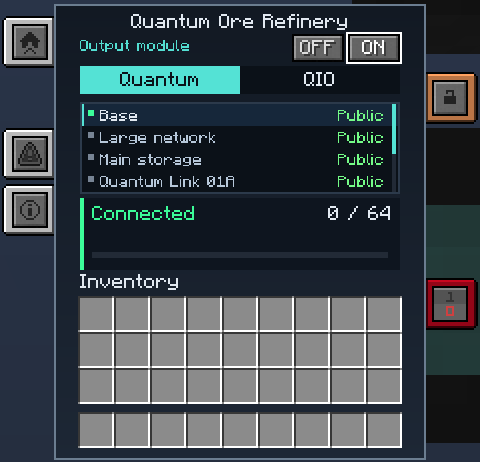
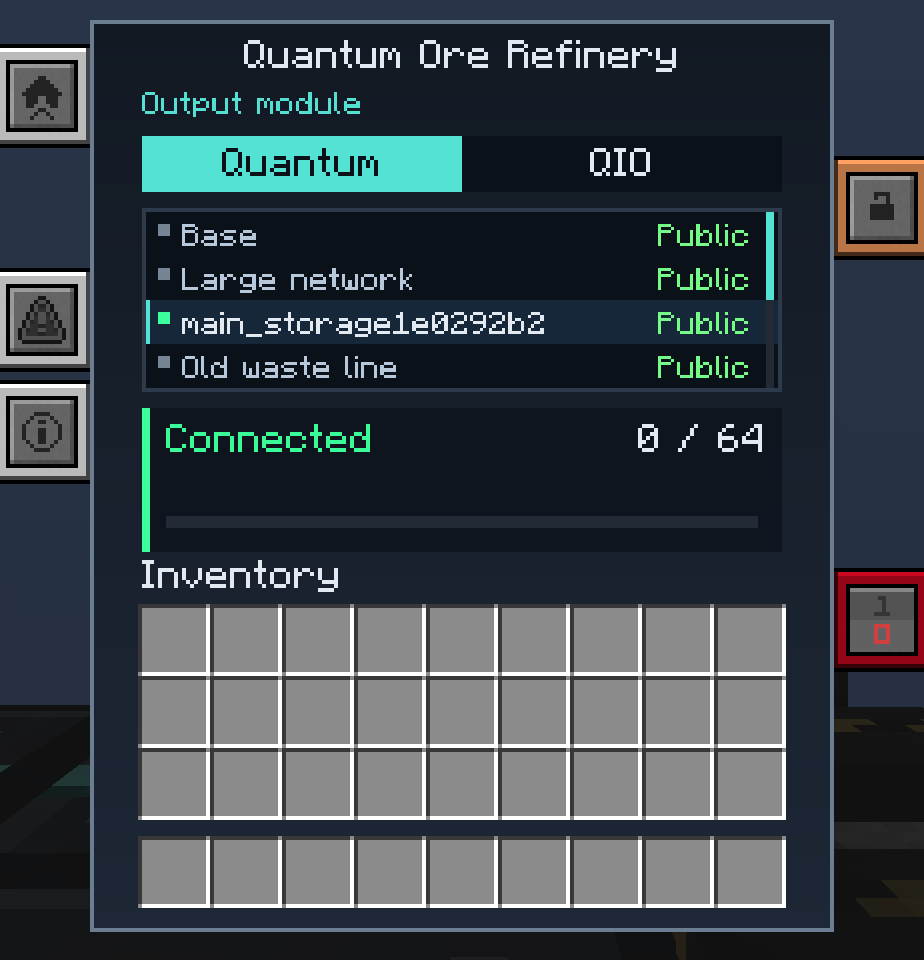
Home: “Running at x2”, what x5 is missing, the levels x5 to x1, Always run and the nine ore slots.Buffers: the four tanks, full, and the level each one unlocks.Stats: production, energy, accelerators, and level by level what is waiting.Output module: Quantum or QIO, the frequency, and the buffer of 64 stacks.
An optional block in the structure. With it, the products go to a buffer of 64 stacks and are sent every half second to a Quantum frequency or to a QIO you choose on its screen (public, trusted or private frequencies). The Output module tab sits right under Home on the controller screen, and the frequency is picked there. A full or missing destination keeps the products in the buffer: nothing is lost. Without the module, or without a frequency, the products leave by the output port. When the structure also has an output port, it is the spare buffer: what the module’s buffer cannot hold leaves by the port. With no output port, a full buffer makes the refinery wait, and nothing is lost. An Off / On switch on the module’s screen turns it off without breaking it: while it is off, the refinery works as if the module were not there (the products leave by the output port) and the module keeps its frequencies for when you turn it back on.
Nothing is refused. Anything the refinery cannot process passes through to the output untouched, so a mixed belt can feed it without a filter (a structure with no output port refuses it).
The Output module tab: Quantum or QIO, the frequency, the buffer.
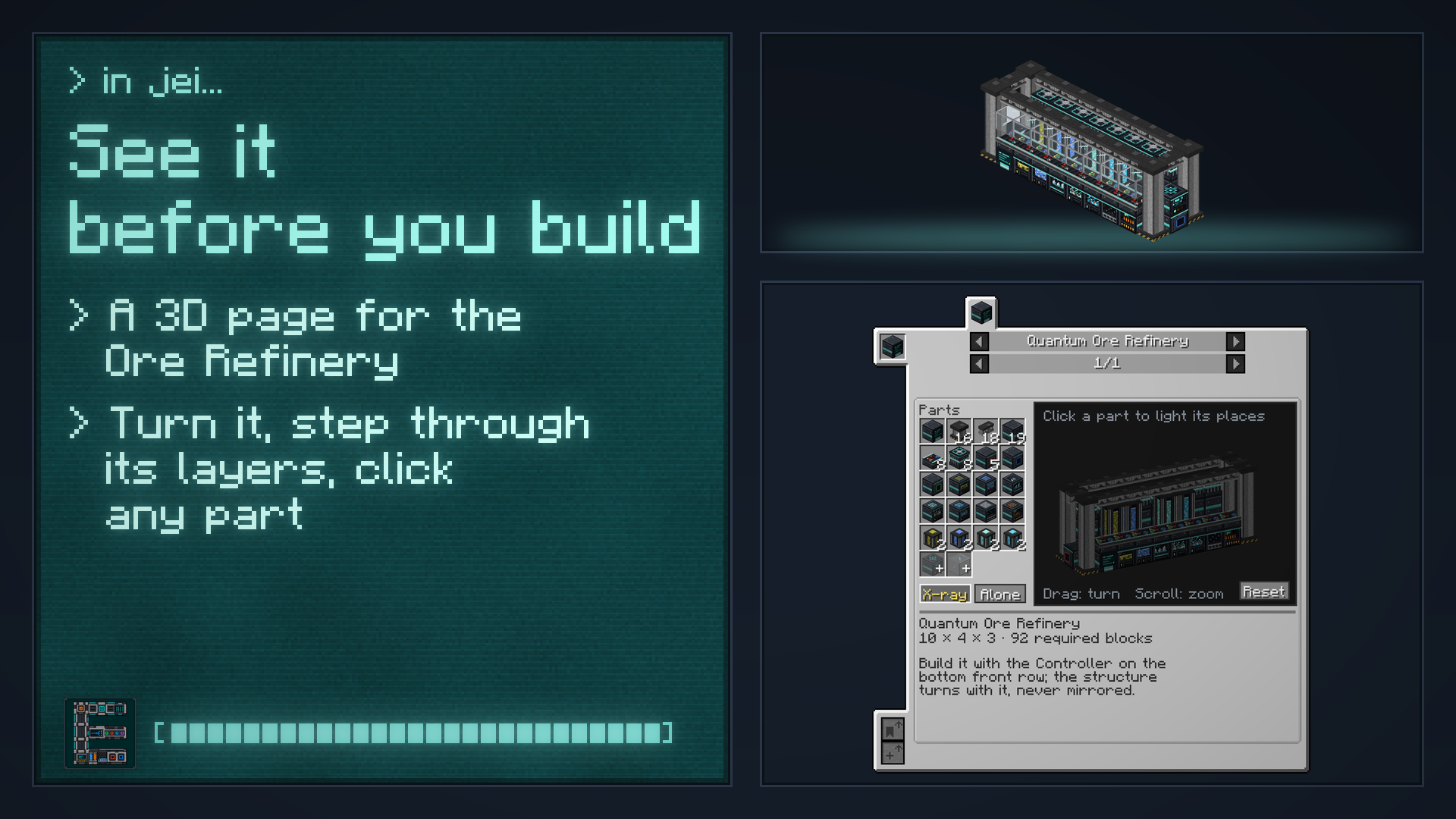
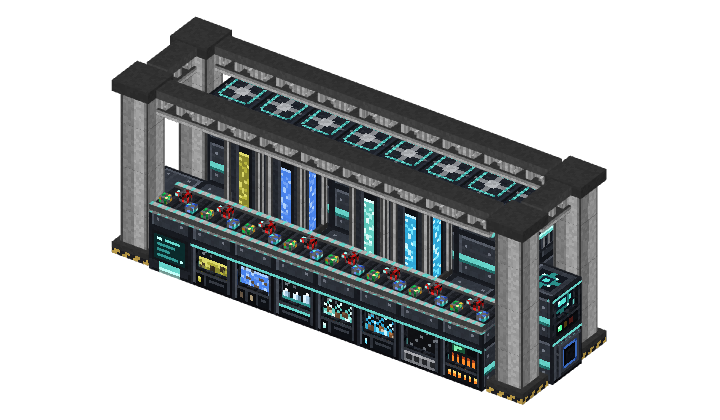
The structure (10 × 4 × 3) has a controller, casings, pillars, girders, conveyors, glass, ports, accelerators, four tanks and seven processing modules (dissolution, washing, crystallization, injection, purification, enrichment, smelting).
The 22 parts of the structure
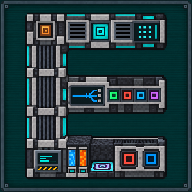
The structure has 18 places where a port can go: eight on each of the two lower floors of the back wall, between the two pillars, and one at the foot of each end. The drawing shows seven ports (five input, one output, one energy), but the structure needs only at least five input ports and at least one energy port, and the output port is optional: none or one. The energy port goes on the back wall; the two ends of the structure take only item input or the output, and the Quantum/QIO module sits at the output end. The free cells on the outside of the structure take any block, so you can wall or roof it with whatever you like; the free cells inside stay for air, glass or casing, and the module’s cell keeps its own rule. It forms by itself within a second of the last block being placed, tells you which block is wrong when it does not, and never loads a chunk to look. Like Mekanism’s multiblocks, red dust runs along its edges when you complete it.
18places where a port can go
≥ 5input ports
≥ 1energy port
0 or 1output port, optional
Ports. The input port takes ore as items, water as fluid and the three gases; sneak and click it with a Configurator to turn it between items, fluids and gases, a plain click shows its mode. The output port gives the products to a pipe, a hopper or a chest. The energy port takes Joules and Forge Energy. A port serves only one refinery. With no output port and no Quantum/QIO module linked, the refinery still forms but does not process any ore and shows “No output”; it takes and loses nothing, and carries on as soon as you add an output port or link the module.
Take it apart with a Wrench, like Mekanism’s own blocks. Breaking the controller keeps what it holds in its item.
Conveyors that carry real ore. Ore chunks of lapis, diamond, redstone, coal, glowstone and emerald ride the belts, instead of one plain sand colour.
Recipes. This is an end-game build: the structure blocks are made from Steel Casing, atomic alloys and ultimate circuits, the controller needs a Teleportation Core, an Ultimate Energy Cube and an Enrichment Chamber, each processing module is built around its Mekanism machine, and the tanks use Ultimate Fluid and Chemical Tanks with structural glass. They are shown in JEI.
JEI page. A page for the structure with a 3D view you can turn, the four layers and a grid of its 22 parts: click a part to light it in the view, with X-ray and “Alone” modes. Every block of the structure also has its own help sheet that leads to the page.
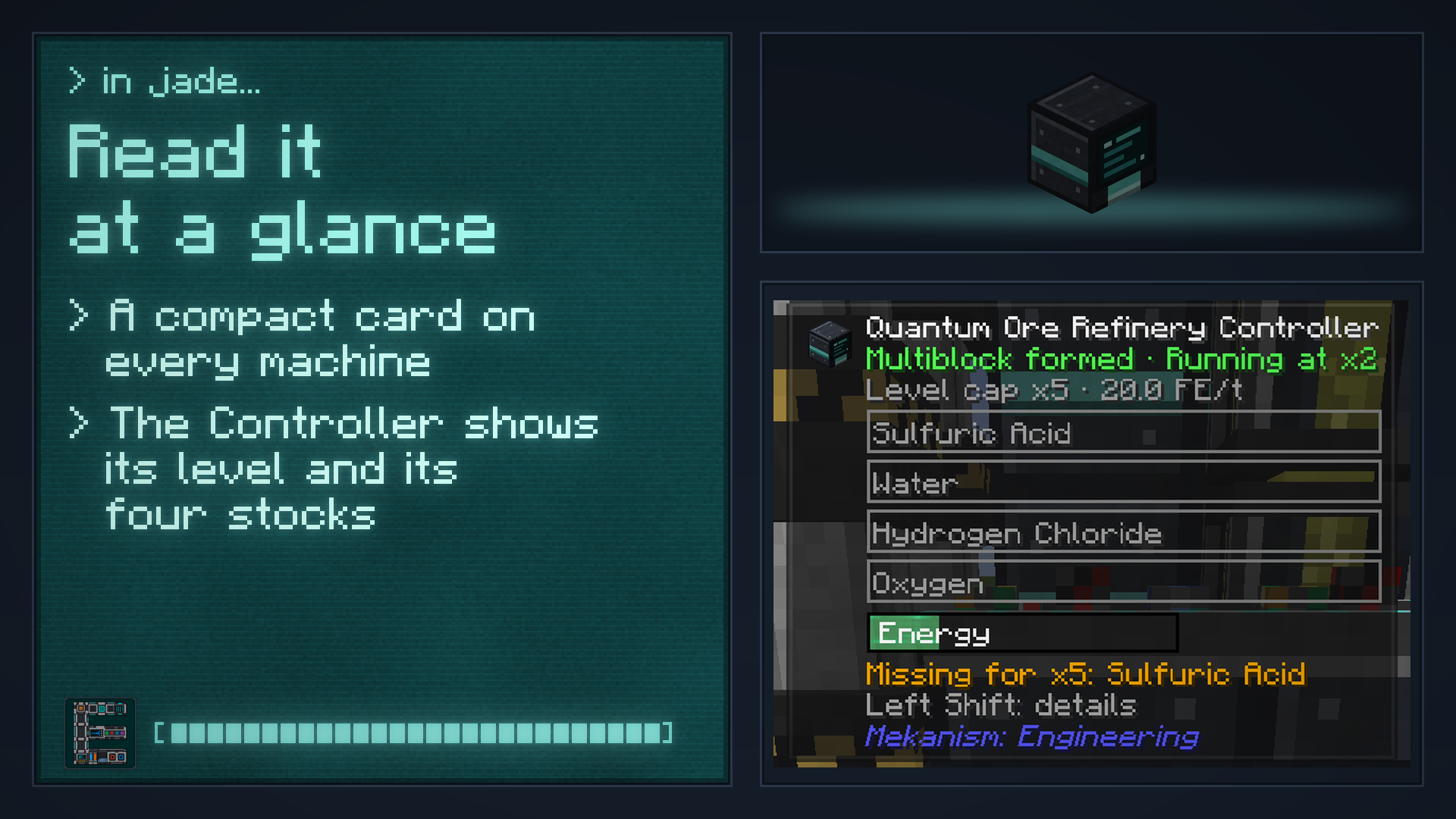
Jade and WTHIT. Any block of the structure shows the refinery’s state and level, the four stocks as gauges (drawn with the real fluid and chemical textures) and, for a port, its mode and what it serves. In Jade, the Quantum/QIO module has its own card with its buffer and a warning when the destination is full.
JEI: the structure in 3D, its layers and its parts.Jade: the level, the four stocks and what is missing.
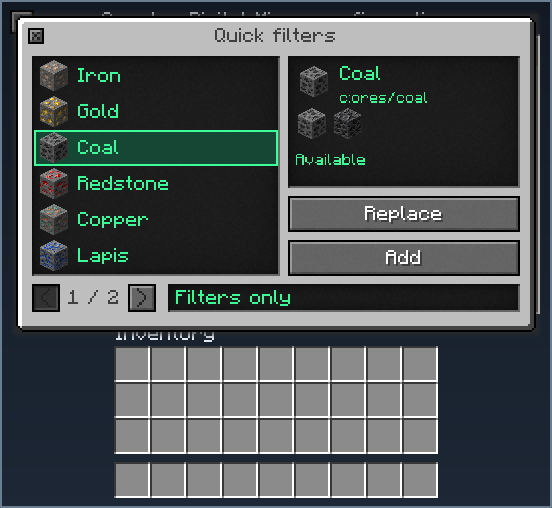
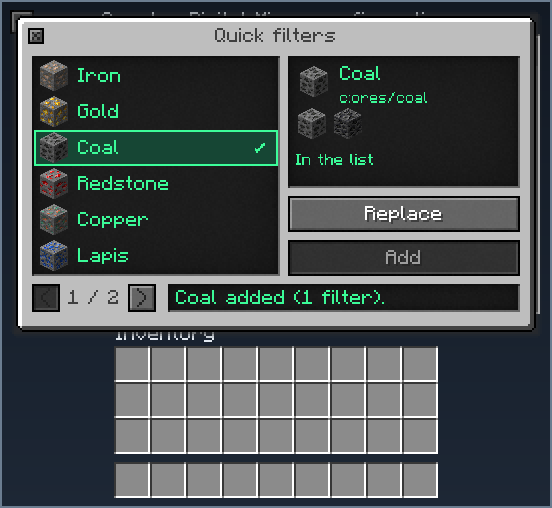
Iron, gold, coal and redstone ores are always listed. Copper, lapis, diamond, emerald, tin, lead, osmium and uranium ores are listed whenever their ore tag exists in your game.
Adds it only if the same tag filter is not already there.
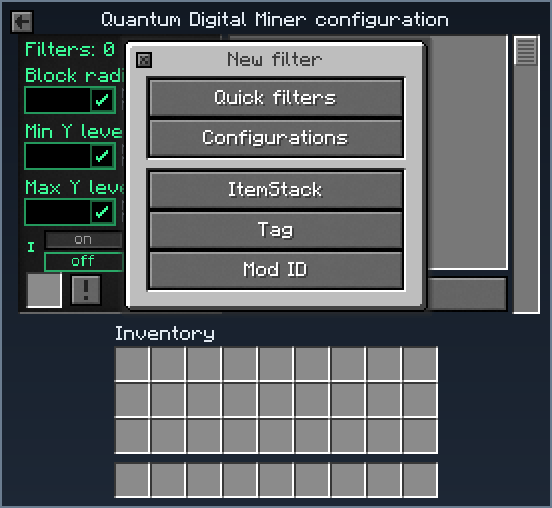
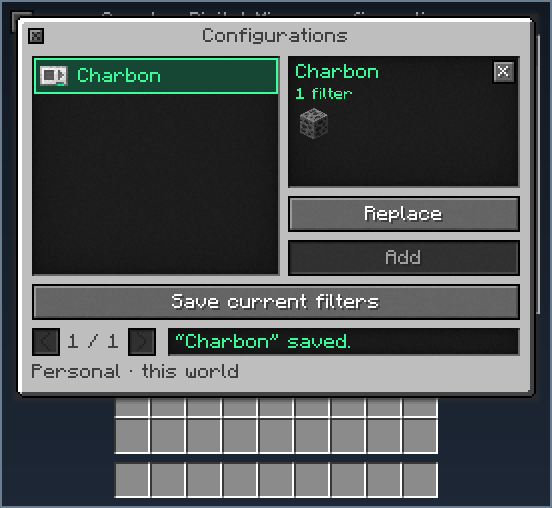
The New filter window starts with Quick filters and Configurations.Coal chosen: its tag c:ores/coal, then Replace or Add.Add: “Coal added (1 filter)”, the filter is in the list.Configurations: the list saved as “Charbon”, ready to load on any miner.
Other mods’ ores included. Each quick filter is an ordinary Mekanism tag filter on the common ore tag, so the ores that other mods put in that tag are mined too. Nothing is scanned and no chunk is loaded to build it.
Save the miner’s filter list under a name, then load it on any miner with Replace or Add. Each player has their own library in the world or on the server: up to 32 lists of 128 filters, with names up to 24 characters.
32saved lists per player
128filters in a list
24characters in a name
Only the filters change. Radius, height, Silk Touch and every other setting stay as they are.
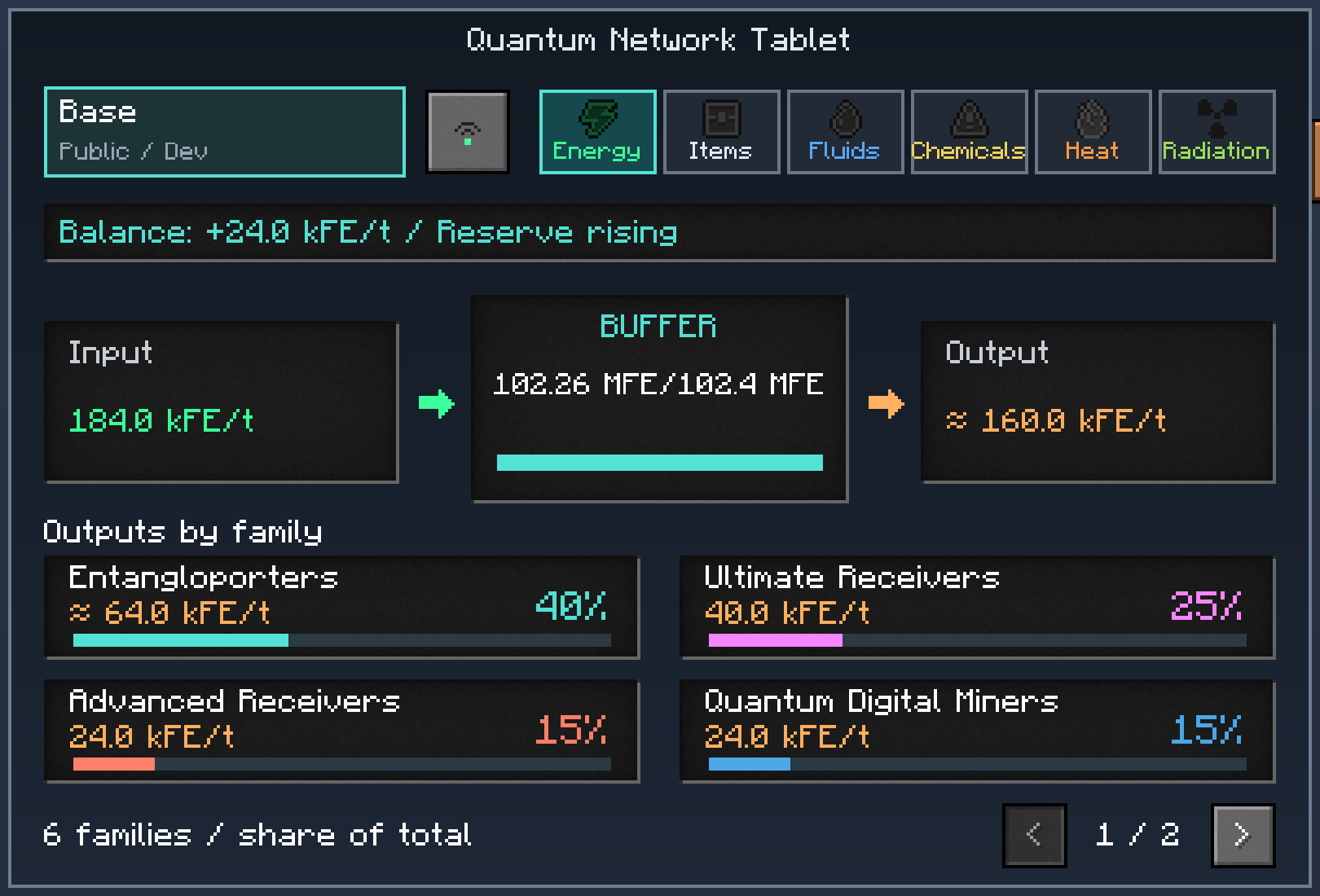
The Quantum Network Controller now fits in your hand. The tablet opens the same screen, with the same rights, wherever you are; it loads no chunk to do so.
A Controller alone in the crafting grid becomes a tablet, and a tablet becomes a Controller again. Its owner, security mode and name are kept both ways.
The screen now shows each frequency as what goes in, what it holds and what goes out.
Devices are grouped by family (Entangloporters, Quantum Energy Receivers, Quantum Digital Miners, Quantum Chargepads), each with its rate and its share of the whole side.
A figure that could only be deduced is marked “≈”, one that cannot be known is marked “?”, and a total is marked “≥” when a device could not be read (its chunk is not loaded, or you may not access it).
A trend line tells whether the frequency’s stock is filling or emptying. Radioactive chemicals have their own “Radiation” tab.
Figures sooner. One device still being measured no longer blanks the whole frequency: only its own family waits, the others keep their figures. The screen shows the last figures it has for the same frequency and resource while the new ones are measured (30 seconds by default, a server setting; 0 turns it off).
A long frequency name shows in full when you hover it.
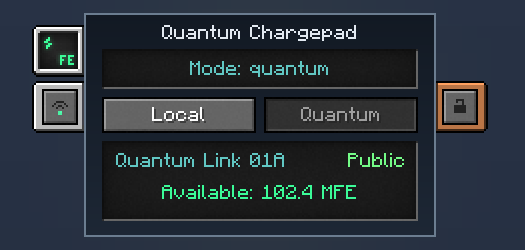
The Quantum Chargepad now has a screen and two modes.
Local (the default) is what the pad has always done: energy comes in by cable. Existing pads load as local and lose nothing.
Quantum takes the energy from a quantum frequency you choose on the pad’s screen (public frequencies, your own private ones, and trusted ones). In this mode the pad takes no energy from cables.
Charging is unchanged: every item of the players standing on it, armour first. Changing the mode never converts or loses energy.
A pad in quantum mode appears in the Quantum Network Controller as its own family.
The pad now has Mekanism’s security tab. Its owner, security and mode are kept when you pick it up; its frequency is not, so a pad always starts unlinked when placed.
Your Quantum Digital Miner now tells you, with a notification and Minecraft’s notification sound, when:
mining is complete (or complete in the loaded chunks only), with the number of blocks mined in the cycle;
mining is paused, with the reason: not enough energy, storage full, overflow items to clear, replacement block missing, placement refused, or area not loaded;
a relocation is complete.
The notification shows the machine’s icon, a title, a detail line and the place: dimension and X, Y, Z. When only the loaded chunks of the zone were mined, a half-filled bar says so. Only the owner is notified, and only while connected; a miner with no owner notifies nobody. Beyond eight at once, the rest are counted in a single “+N more” notification. A client setting turns them off.
Broken by its owner, a miner keeps all its settings and its frequencies (energy, QIO, import and export links) in its item. Placed again, it is as it was.
Broken by another player, or by nothing (an explosion, a machine), it loses the frequencies and links and keeps everything else: region, modes, filters, redstone mode, sources and zones. A miner with no owner keeps everything.
The Configuration Card copies the settings and the frequencies and links its user may carry, never the identity, the energy, the contents or the zone history, and it never recreates a frequency that no longer exists.
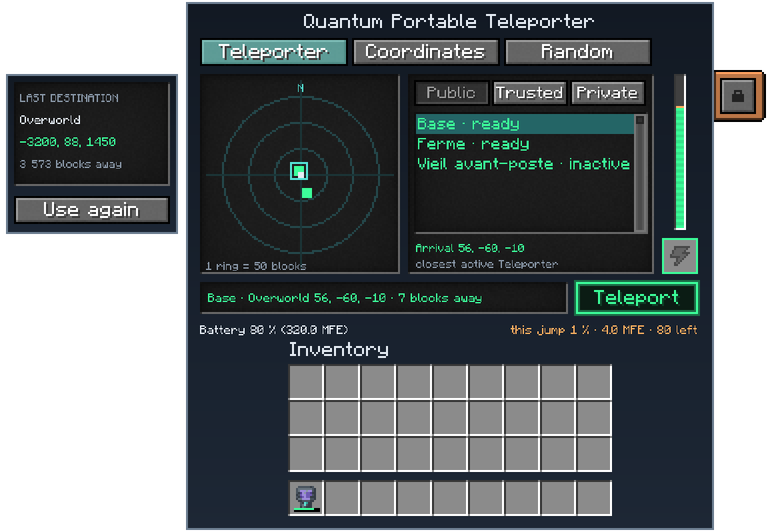
Pick a dimension from a list. In the coordinates tab, the dimension button opens a drop-down list (with a scroll bar for long lists) instead of cycling through dimensions one click at a time; a click outside or Escape closes it without changing anything.
It remembers what you chose last: the Teleporter frequency you jumped to, or the coordinates you typed, never both. A random jump remembers neither. Use again puts your last choice back and never teleports by itself: press Teleport when you are ready.
For server owners: forbid the precise-coordinates tab (allowCoordinates) or the random tab (allowRandom), and list dimensions where those two tabs are blocked while the player stands in them (coordinateAndRandomBlockedDimensions). Teleporting by frequency is not affected. By default nothing changes: both tabs are allowed and the list is empty.
A new /mekeng command, for operators, with nothing destructive without confirm and no chunk ever loaded:
/mekeng build quantum_ore_refinery builds a whole refinery where you aim (choose its level, accelerators and module, or build it empty), and /mekeng remove quantum_ore_refinery takes one down. It only takes the refinery’s own blocks: a block of another mod placed on one of its free cells stays where it is. /mek build quantum_ore_refinery works too, through Mekanism’s own build command.
/mekeng refinery check | info | fill | clear | level | alwaysrun | accelerators inspects and drives a refinery: which cell is wrong, what it holds, fill its tanks and energy for a test, empty a group of slots.
/mekeng miner info | find | list reads the Quantum Digital Miners of your server.
/mekeng about prints the versions and the settings that matter.
The accepted Mekanism range now runs up to 10.7.23, so the unofficial Mekanism Overclocked edition (10.7.20 to 10.7.23.3, same mod id) loads with the addon. The five official builds from 10.7.15 to 10.7.19 stay the supported ones.
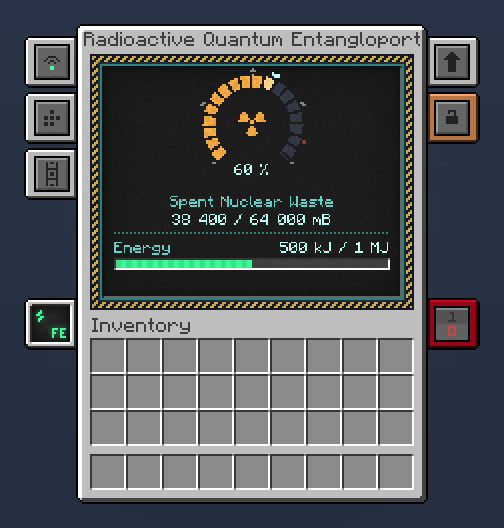
The block now carries radioactive chemicals only (Spent Nuclear Waste and any other chemical Mekanism marks as radioactive), over radioactive frequencies of its own. Items, fluids, ordinary gases, energy and heat are the job of Mekanism’s own Quantum Entangloporter.
64,000 mBlocal buffer in each block
10 mB/treception, for each receiver
1,000,000 Jits own energy reserve
100 → 10 Jper mB, with Energy Upgrades
Radioactive frequencies are separate from Inventory frequencies: no other Entangloporter, Receiver or Controller sees them. They work like Mekanism’s frequencies (Public, Trusted, Private) and are chosen, created and deleted in a window copied from Mekanism’s own.
A local buffer of 64,000 mB in each block, and slow reception: 10 mB per tick for each receiver. What a block does with its gas follows its chemical side configuration, as on a Quantum Entangloporter: an input face fills the buffer, an output face empties it, and a face set to both does both.
Its own energy reserve of 1,000,000 J pays the transfers, 100 J per mB at each end. The reserve never comes out through a face; without energy the block stops and keeps what it holds.
Energy Upgrades. The block takes Mekanism’s standard Energy Upgrade, in the usual upgrade tab. Each upgrade raises the reserve (up to 10 MJ with 8 upgrades) and lowers the price of a transfer (down to 10 J per mB).
A new screen: a dark security console with a dial that fills with the buffer, the chemical it holds and its energy.
Dismantling is refused while the buffer holds anything, with a message that says why.
New recipe: Quantum Entangloporter in the middle, 4 plutonium pellets, 2 polonium pellets and 2 HDPE sheets.
Saves from 1.1.1 load unchanged. The radioactive stock that earlier versions kept on an Inventory frequency stays where it is and can only be emptied through this block, never filled.
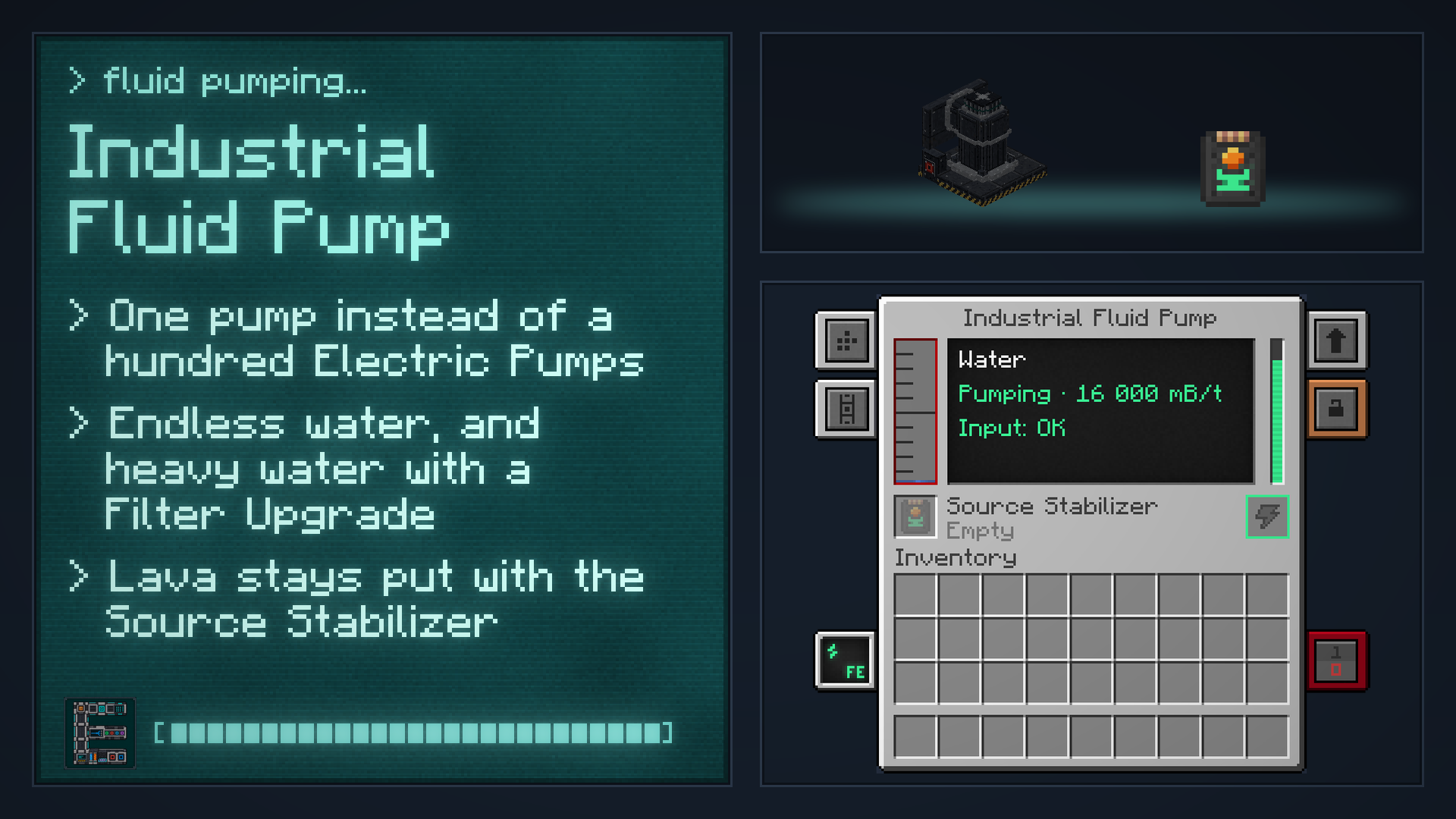
Every Quantum screen is the same blue: the Chargepad, the four Quantum Energy Receivers, the Radioactive Quantum Entangloporter, the Network Controller and Tablet, the Digital Miner’s configuration and the refinery. The Industrial Fluid Pump keeps its grey, since it is not a Quantum machine.
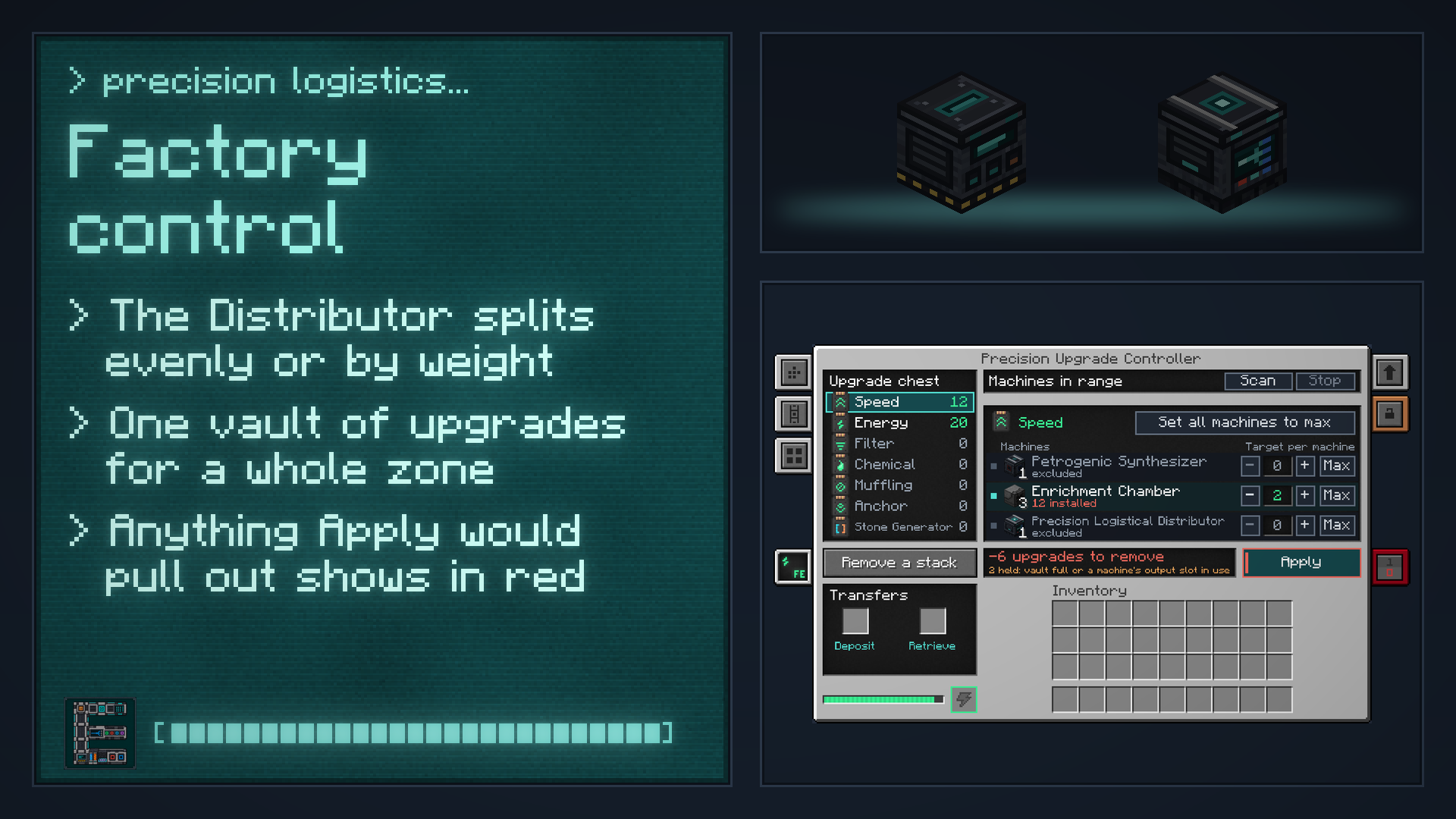
Tabs where Mekanism puts them. The Quantum Energy Receivers, the Chargepad and the Precision Logistical Distributor use Mekanism’s own side-configuration tab and remember the windows you opened.
The same frequency window everywhere. The Quantum Energy Receivers and the Chargepad open Mekanism’s own frequency selector, the same window as the Quantum Digital Miner. A frequency whose radioactive stock still holds something cannot be deleted from any Engineering block.
The Quantum machines: their screens are now the same blue.
New textures for the Precision Logistical Distributor and the Precision Upgrade Controller; the Distributor’s routing window is now Mekanism’s grey, with an eye to hide the neighbouring blocks, and its mode buttons look like Mekanism’s.
Cleaner ports, new belts. The refinery’s ports have a thin frame, and its conveyors carry ore.
Clearer words. A Receiver without a frequency tells you where to set it; the refinery says “Waiting for the chosen level” instead of “Idle”; the Configurator is named on the input port’s description; the Upgrade Controller explains its “excluded” and “Transfers” labels; “Silk touch” is written one way everywhere; the French translation uses the infinitive for instructions and no longer mixes English words in (proper names are kept).
Bigger text on the Quantum Portable Teleporter and the Digital Miner Companion.
Machines held in hand. The Quantum Energy Receivers sit in the middle of the hand, the Petrogenic Synthesis Plant shows correctly in first person, and the Quantum Digital Miner, the Industrial Fluid Pump and the Plant are carried with both hands.
Quantum Fluid Pump is now called Industrial Fluid Pump. Only the name changes: existing pumps, recipes and saves are untouched.
Pipes of any maker. The Industrial Fluid Pump’s intake takes a pipe from any mod (Mekanism Extras included), and its energy ports lend energy to any provider.
A block that became unbreakable or turned into a liquid after the search is now left in place.
On a busy server, searches keep progressing instead of reporting loaded chunks as unloaded.
The front screen no longer shows an energy warning while the miner is mining normally; the warning now appears only when the miner really ran short.
One damaged entry in the mined-zone history no longer causes the others to be lost.
Relocation is safer. A move whose new platform cannot be fully placed fails and is undone, leaving the world as it was. An undo that cannot put a block back keeps its record and asks for recovery instead of silently losing it. A refused removal no longer leaves a second miner behind. A damaged undo record is refused before anything is written.
Moving a miner on Windows no longer fails the first time an antivirus or file indexer briefly holds one of the files the move saves (the undo record, the list of miners and the player’s data). The replacement of the file is now tried up to three times, 20 milliseconds apart. If it is still refused after the third try, the server stops with an error, as described under “Good to know”.
Petrogenic Synthesis Plant. Items are no longer lost when an output is removed while the Plant is inserting into it.
Precision Logistical Distributor. Two different items whose data happened to look the same no longer share their place in the fair rotation.
Precision Upgrade Controller. Upgrade types it does not know (for example from an addon you removed) are kept in its vault instead of being deleted, and come back if the addon returns.
Radioactive Quantum Entangloporter. A stored chemical whose mod was removed is kept instead of being lost, and is usable again once the mod returns.
Quantum Energy Receivers. They can only select an existing frequency through Mekanism’s own frequency packets: a modified client can no longer create or remove one through them.
Digital Miner Companion. Two different sets of settings or filters can no longer be mistaken for the same one, so a change is never skipped.
Configurator. Its block overlay no longer shows a stale texture after resources are reloaded.
A jump refused by another mod costs no energy, and the reason is shown.
Forbidden dimensions are checked again just before the jump.
Arriving next to a chunk that is not loaded is refused instead of skipping the safety checks; a loaded neighbouring chunk is checked as usual (lava at the edge, for example).
With Surface on, its label no longer overlaps the Y number: the Y field is hidden while Surface is on, and comes back with Here.
Minecraft 1.21.1, Java 21 and NeoForge 21.1.200 or later in the 21.1 series. Install the addon and Mekanism on both the client and the server.
Mekanism 10.7.15 up to, but not including, 10.7.24: the five official builds from 10.7.15 to 10.7.19, and the unofficial Mekanism Overclocked edition (10.7.20 to 10.7.23.3).
Optional: JEI 19.25.1.332 or later, Jade 15.10 or later, WTHIT. Without them nothing changes.
Mekanism: Engineering is an unofficial addon, independent of the Mekanism team. Please report issues to this project, not to Mekanism.
Written from the mod's own wiki and data files (05759a70, 2026-11-07).Mod v1.3 for Minecraft 1.21.1 (NeoForge, Mekanism 1.21.1-10.7.19.85) and Minecraft 1.20.1 (NeoForge, Mekanism 1.20.1-10.4.16.80).Block and item pictures are drawn from the game's models and textures; Mekanism's are under the MIT licence.Not an official Minecraft product, not approved by or associated with Mojang or Microsoft.
 8
 4
 10 × 4 × 3