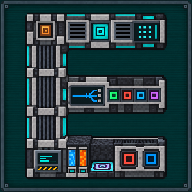
Digital Miner Companion
Link a Digital Miner, see what it would mine, prepare its filters, start, pause and reset it from anywhere.
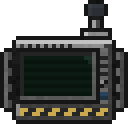 ⟲ Drag to turn
| Type | Tool |
| Size | Held item, does not stack |
| Energy | Its own battery: companion.energyCapacity (256 MJ by default), charged at up to companion.chargeRate (1 MJ/t) in any Mekanism charger or energy cube. Spent only on relocating a Quantum Digital Miner (relocation.energyCost, 80 MJ by default) |
| Upgrades | None, it is a tool, not a machine |
| Side configuration | No, it is an item, not a block |
What it does
Section titled “What it does”The Digital Miner Companion links to a Digital Miner or a Quantum Digital Miner and lets you read and control it from anywhere: any distance, any dimension, as long as its chunk is already loaded somewhere (the Companion never loads one itself) and Mekanism’s security lets you in.
- Linking: shift + right-click a Digital Miner or a Quantum Digital Miner to link the Companion to it,
replacing any previous link. A short cooldown (
surveyor.cooldownTicks) keeps a held-down click from linking twice. When the linked machine is broken or replaced by another one, the Companion forgets it by itself and goes back to unlinked (in your hand, in the open screen or in your inventory); a machine that is merely out of range, or in a chunk or dimension that is not loaded, keeps its link. - Right-click anywhere opens the Companion, on two tabs:
- Mining: a draft configuration and filter list you edit before sending it, and an on-demand, read-only Scan that counts, around the linked machine, the blocks the draft would currently mine. No chunk is loaded and the machine is never started; a scan that meets unloaded chunks is reported as partial.
- Digital Miner: the linked machine’s live state (online, or why not), its stored energy, upgrades, its own filters and configuration, remote Start / Stop / Reset using the machine’s own rules, and, for a Quantum Digital Miner, its zone number, its item output source and its relocation panel.
- Pull replaces the draft with the linked machine’s current filters or settings; Push sends the draft to the machine, only while it is not ready (stopped and reset), exactly Mekanism’s own rule for editing a Digital Miner’s configuration. If the machine changed since the last Pull, Push asks for a second click before overwriting it.
- Shift + right-click any other block opens a small window to add it to the draft’s filters: the exact block, or one of the block tags the Digital Miner can use.
- Relocation (Quantum Digital Miner only): once its zone is fully mined, the Companion can move it to a
neighbouring zone it has never mined:
- Automatic: drawn at random among up to 8 free neighbouring zones.
- Manual: placed in front of you, past a safety margin (1–8 blocks, 3 by default), at your feet’s height, turned back toward you; you can turn the destination by quarter turns before confirming.
- Either way, the machine charges in place for
relocation.chargeTicks(30 ticks by default) before it departs, the destination is revalidated right before the move, and the whole move happens in a single tick so it cannot be interrupted halfway. The 5 × 5 platform it lands on is generated for free (25 stone), and any block in its way is destroyed on the spot rather than dropped, so nothing duplicates. The cost,relocation.energyCost(80 MJ by default), is taken from the Companion’s own battery, never from the machine.
- Item and antenna LED: shows a cached state at a glance (grey when offline or unlinked, red when not ready, blinking amber while working, dim amber while paused, green when finished), refreshed while the item sits in a player’s inventory.
Crafting
Section titled “Crafting”


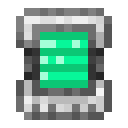

- 4 × any Ultimate Control Circuit
- 1 × any Glass Pane
- 2 × any Atomic Alloy
- 1 × Energy Tablet
- 1 × Teleportation Core
- U (×4): any Ultimate Control Circuit
- G: any glass pane
- A (×2): any Atomic Alloy
- E: Energy Tablet
- T: Teleportation Core
The Energy Tablet’s stored charge carries over into the Companion’s own battery, so crafting it with a charged tablet saves a trip to a charger.
Getting started
Section titled “Getting started”- Craft the recipe above.
- Shift + right-click a placed Digital Miner or Quantum Digital Miner to link the Companion to it.
- Right-click anywhere to open the Companion.
- On the Mining tab, add filters (shift + right-click blocks in the world) or Pull the machine’s own filters, then Scan to see what they would currently mine.
- Push the draft to the machine (only while it is stopped and reset), or use Start / Stop / Reset on the Digital Miner tab to run the machine’s own filters as they are.
- Charge the Companion in any Mekanism charger or energy cube before relocating a Quantum Digital Miner.
The interface
Section titled “The interface”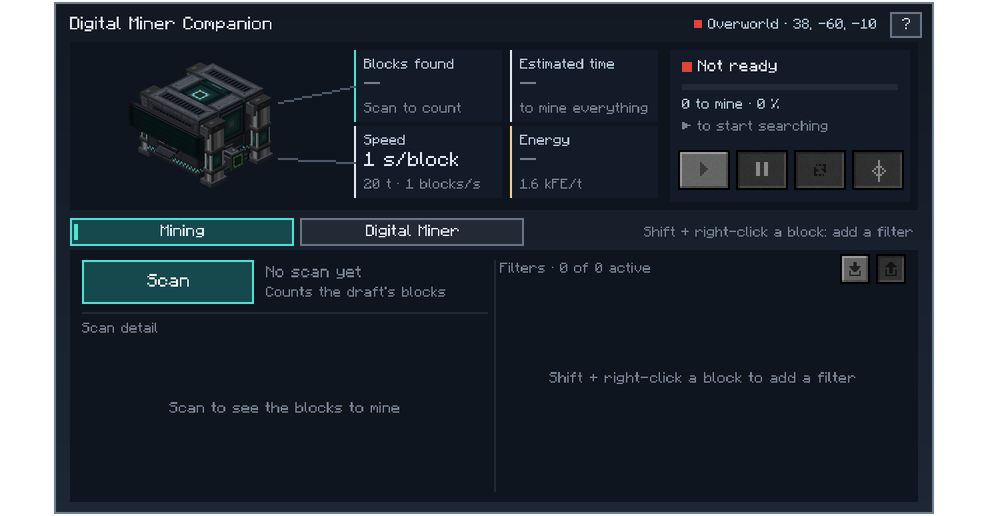
- Header: link status: the linked machine’s position and online state, or why it is offline (chunk not loaded, access denied); a machine that was destroyed or replaced is forgotten and the Companion shows as unlinked, with the LED’s colour.
- Mining tab: three stat tiles (blocks found, estimated time, energy, with Mekanism’s own energy tab for units), the Scan button, a paginated block-by-block detail, and the filter list (enable, disable, remove, Pull, Push).
- Digital Miner tab: the linked machine shown in 3D, its live state and progress, Start / Stop / Reset, its configuration (radius, Y range, Silk touch, auto-eject, auto-pull, inverse mode, with Pull/Push and a conflict warning), and, on a Quantum Digital Miner, its zone, item output source and a Relocate button that opens the relocation panel (mode, margin or destination preview, energy cost, confirm).
- Shift + right-click on a block other than a Miner opens Add a filter: the exact block, or one of the block tags the Digital Miner can use, each with the number of blocks it covers. A plain right-click on any block just opens the Companion’s screen.
Automation
Section titled “Automation”Not automatable, it is a hand tool, but:
- It charges like any Mekanism energy item, in chargers and energy cubes; nothing drains it except a manual relocation.
- Its link, draft configuration and cached status all live in the item itself, so it keeps them across inventories and dimensions; nothing is lost by simply holding or storing it.
Configuration
Section titled “Configuration”Server config, section surveyor (linking, reading, scanning):
| Key | Default | Range | Meaning |
|---|---|---|---|
enabled | true | – | Turns off linking, reading, remote control and relocation entirely |
cooldownTicks | 10 | 1–200 | Shortest time between two links from the same player |
estimateEnabled | true | – | Turns the Scan on or off |
estimateBudgetMicros | 2,000 | 100–20,000 | Server-thread time per tick shared by every running scan |
estimateMaxBlocks | 4,000,000 | 1–50,000,000 | Refuses a scan whose configured volume is larger than this |
estimateMaxConcurrent | 4 | 1–32 | Most scans running on the server at once |
Section companion (its battery):
| Key | Default | Range | Meaning |
|---|---|---|---|
energyCapacity | 256,000,000 J (256 MJ) | 1 J – no limit | Energy the Companion stores |
chargeRate | 1,000,000 J/t (1 MJ/t) | 1 J/t – no limit | Energy it accepts per tick while charging |
Section relocation (moving a Quantum Digital Miner):
| Key | Default | Range | Meaning |
|---|---|---|---|
enabled | true | – | Allows relocating a finished Quantum Digital Miner |
energyCost | 80,000,000 J (80 MJ) | 0 J – no limit | Energy taken from the Companion for one relocation |
gap | 2 | 0–64 | Blocks left untouched between a finished zone and the next |
maxHeightDifference | 3 | 0–16 | Largest ground height difference tolerated under the 5 × 5 platform |
maxHistory | 256 | 1–4,096 | Finished zones remembered per machine |
candidateTimeoutTicks | 200 | 20–2,400 | Ticks to wait for a candidate place’s chunks to load |
ceilingSearchRange | 16 | 1–64 | In dimensions with a ceiling (the Nether), blocks searched for a floor |
chargeTicks | 30 | 0–200 | Ticks the machine charges in place, whole and unchanged, before it moves |
Tips and troubleshooting
Section titled “Tips and troubleshooting”- “Push only while the Miner is not ready”: reset the machine first (its own screen, or the Companion’s Reset): Mekanism refuses configuration changes on a running or searching Digital Miner.
- Offline: the header names the exact reason: chunk not loaded (nobody force-loads it for you), machine destroyed, replaced by another owner’s machine, or access denied by Mekanism’s security.
- No Relocate button, or it refuses: only a Quantum Digital Miner relocates; it also needs its zone finished (0 blocks left) and a charged Companion.
- Relocation fails with “no valid neighbouring zone”: every candidate around it overlaps an already-mined
zone, crosses the world border, or has no room to load in time: try again later or reduce
gap.
In-game texts
Section titled “In-game texts”What the game itself shows for this item: the description under Shift, the tooltips and the JEI information page, word for word.
Digital Miner Companion
- JEI · Role
- Scans, prepares filters and controls an accessible miner; moves a finished Quantum Digital Miner.
- JEI · Supply
- A selected, accessible miner; chargeable energy; a block to search for.
- JEI · Result
- Prospecting, filter preparation and commands to the miner; relocation of the Quantum Digital Miner.
- JEI · Good to know
- Works with the Digital Miner and the Quantum Digital Miner; only the latter can be relocated.
- JEI · Good to know
- The miner's state is kept during relocation.
Written from the mod's own wiki and data files (05759a70, 2026-11-07).Mod v1.3 for Minecraft 1.21.1 (NeoForge, Mekanism 1.21.1-10.7.19.85) and Minecraft 1.20.1 (NeoForge, Mekanism 1.20.1-10.4.16.80).Block and item pictures are drawn from the game's models and textures; Mekanism's are under the MIT licence.Not an official Minecraft product, not approved by or associated with Mojang or Microsoft.