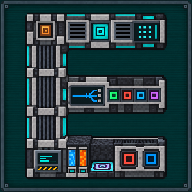
Quantum Ore Refinery
Mekanism's whole ore-processing chain in one multiblock: put ore in, get up to five ingots out of each.
How to build it
Block by block, in an order that is easy in game. Stand in front of the controller: left and right are yours, and layer 1 is the bottom one. Only the kind of block matters in each cell, not the way it faces.
| Type | Multiblock machine |
| Added in | 1.2.0 |
| Size | 10 × 4 × 3 blocks, 92 required blocks (see Structure and parts) |
| Energy | The Enrichment Chamber’s usage per tick, read from Mekanism’s configuration (usage.enrichmentChamber, 50 J/t by default); a stored buffer at least large enough for a stack of 64 ore recipes (640,000 J by default) |
| Upgrades | None |
| Side configuration | No Mekanism side configuration: the structure’s port blocks (eight in the drawing) do the work. The input ports switch between items, fluids and gases with a Configurator |
What it does
Section titled “What it does”The Quantum Ore Refinery takes ore and turns it into ingots. It does not invent its own recipes: its five levels are the five ore-processing chains of Mekanism, run one after another inside the machine, using Mekanism’s own recipes for every step. The higher the level, the more ingots one ore gives, and the more chemicals the job takes from the refinery’s tanks.
| Level | Chain (Mekanism machines it stands for) | Ingots from one iron ore | Taken from the tanks, for one iron ore |
|---|---|---|---|
| x1 | Smelting only | 1 | nothing |
| x2 | Enrichment, then smelting | 2 | nothing |
| x3 | Purification (ore and oxygen), Crusher, Enrichment, smelting | 3 | 200 mB oxygen |
| x4 | Injection (ore and hydrogen chloride), Purification (shards and oxygen), Crusher, Enrichment, smelting | 4 | 200 mB hydrogen chloride, 800 mB oxygen |
| x5 | Dissolution (ore and sulfuric acid), Washing (water), Crystallization, Injection, Purification, Crusher, Enrichment, smelting | 5 | 200 mB sulfuric acid, 5,000 mB water, 1,000 mB hydrogen chloride, 1,000 mB oxygen |
The figures in the last two columns are what Mekanism’s recipes give for iron ore with Mekanism’s default settings. Every quantity is read from the recipes of the item at each step, so another ore gets its own ratios: three raw iron, for example, make 4, 6 and 10 ingots at x2, x3 and x5. A recipe that Mekanism or a modpack changes changes the refinery with it. A level for which an ore has no recipe in the chain is simply not available for that ore, and nothing is taken. When a modpack’s recipes run an ore through some of the x3 to x5 but not all of them, the levels they leave out stay closed for that ore, even one in the middle (x2 and x4 defined, x3 left out): the cell of that level reads “x3: no recipe for this ore”, the Stats table “Closed”, and with Always run off and the cap on it the controller says “No recipe here”.
What the refinery accepts as ore is every item of the tag mekanismengineering:refinery_ores (ores, raw materials and the
raw-metal storage blocks of iron, gold, copper, osmium, tin, lead and uranium) or of the common tags of ores, raw materials
and raw blocks (c:ores/*, c:raw_materials/*, c:storage_blocks/raw_*; forge: on 1.20.1), as long as Mekanism’s
Enrichment Chamber has a recipe for the item. A datapack extends refinery_ores; removing an ore from refinery_ores no
longer keeps it out when it is also in one of the common tags. An ore stays out of the refinery only when no Enrichment
Chamber recipe takes it.
- One stack at a time. When it is idle, the machine looks at its nine ore slots about once a second and takes the first one that holds something it can refine. A job works that slot’s stack, up to 64 items, in one go.
- Same energy at every level. An ore recipe costs the same energy whatever the level and the speed: 200 ticks of the Enrichment Chamber’s usage, which is 10,000 J with Mekanism’s default 50 J/t. The cost is paid tick by tick over the job (a paused job keeps what it already paid). A stack of 64 ore recipes costs 640,000 J by default.
- Anything else is refused. An item that is not an ore the refinery can work is refused whole by an input port, at every slot: it stays where it came from. A mixed belt must be sorted before the refinery (a filter or a sorter).
- Resources are taken only when the job ends, in the same tick as the ingots appear. If the tanks no longer hold what the level needs at that moment, nothing is taken (see Choosing the level below).
Choosing the level
Section titled “Choosing the level”The machine has two controls, both on the Home screen:
- Level cap. Click one of the level boxes (x1 to x5) to set the most the machine may work at. Until you click, the cap is x5. The machine never works above the cap.
- Always run, OFF or ON (OFF by default).
- OFF: the machine waits until the tanks hold everything the capped level needs for the ore in play, then works at exactly that level. Until then the status reads “Waiting for xN” (N is the level it waits for: the cap) and the screen lists what is missing (“Missing for x5: …”).
- ON: the machine works at the best level up to the cap whose resources the tanks cover. It never goes below x2 (which needs nothing from the tanks) unless you capped it at x1, so it keeps refining while the chemicals fill. A job that finds the resources of its level gone when it ends falls back to the best lower level the tanks cover; with Always run OFF it waits for them instead.
Speed and accelerators
Section titled “Speed and accelerators”- x1 works a whole stack of up to 64 ore in one tick.
- x5 takes 200 ticks (10 seconds) per job with no accelerator. Each of the structure’s eight accelerator places that holds an Ore Refinery Accelerator makes the job shorter; with all eight it takes 4 ticks. The more ingots a level gives, the longer it takes: x4 takes three quarters of the x5’s time, x3 half, x2 a quarter (50 ticks, 2.5 seconds, with no accelerator; 1 tick with eight):
| Accelerators | 0 | 1 | 2 | 3 | 4 | 5 | 6 | 7 | 8 |
|---|---|---|---|---|---|---|---|---|---|
| Ticks per job (x5) | 200 | 123 | 75 | 46 | 28 | 17 | 11 | 7 | 4 |
The time is 200 × 50^(−n/8) ticks for n accelerators, rounded to a tick. An accelerator place may also hold a
plain casing; the structure forms either way. The number of accelerators is read when a job starts.
The controller keeps the machine’s four stocks itself; the tank blocks of the structure only complete the shape. Each stock is the size of about one minute of a Quantum Digital Miner at its maximum:
| Stock | Capacity | Needed from level |
|---|---|---|
| Water | 3,000,000 mB | x5 |
| Hydrogen chloride | 600,000 mB | x4 |
| Oxygen | 600,000 mB | x3 |
| Sulfuric acid | 120,000 mB | x5 |
Building it
Section titled “Building it”The structure is a fixed drawing: Structure and parts shows it layer by layer, with every recipe. In short:
- The Quantum Ore Refinery Controller sits on the bottom front row, second block from the left as you face it. It turns to face you when you place it, and the structure stands behind it and to its right.
- The drawing turns with the controller in quarter turns and is never mirrored.
- Build the rest: casing, pillars, girders, conveyors, ports (the drawing has seven: five input, one output, one energy; you need at least five input and one energy, and the output is optional), seven process modules, four tank cells of two blocks each, and as many accelerators as you like (up to eight).
- The machine checks the structure about once a second and never loads a chunk to do it. While it is wrong, the controller’s screen says which block is wrong or missing and where (“Couldn’t form, expected … at (x, y, z)”).
- When the last block goes in, redstone dust runs along the edges of the structure, like on a Mekanism multiblock (the effect follows Mekanism’s own setting; with it off, a “Multiblock formed” message shows instead).
A port belongs to one refinery: a port already claimed by another controller stops the second structure from forming (“the port at (x, y, z) already serves another Ore Refinery”).
A piece belongs to one refinery too. A casing, a pillar or any other block of the structure that a formed Quantum Ore Refinery needs stays that refinery’s. A second controller whose structure would use the same block does not form: its screen, its chat message and the Jade/WTHIT overlay say “the piece at (x, y, z) already belongs to another formed Quantum Ore Refinery”. Move the second controller away, or take the first refinery down: the second one forms at its next look. Boxes may overlap where one of the two leaves a cell free.
Getting started
Section titled “Getting started”- Build the structure from Structure and parts. The screen says “Multiblock formed” when it works.
- Bring energy to an Energy Port (Joules or Forge Energy, from a cable or an energy block).
- Feed ore to an Input Port in its default Items mode, or put ore in the nine ore slots by hand. x1 and x2 need no chemical. With Always run ON the machine refines at x2 straight away; with it OFF (the default) it waits for the x5 (see Choosing the level).
- For x3 and above, switch other Input Ports with a Configurator (sneak + right click): one to Fluids for water, and one to Gases for each of oxygen, hydrogen chloride and sulfuric acid (a single Gases port takes all three chemicals; each goes into its own tank, and any other chemical is refused).
- Take the ingots from the Output Port with a pipe, hopper or chest placed against it, or add the optional Quantum Module to send them to a Quantum or QIO frequency instead. The machine needs one of the two: with no Output Port and no linked module it forms but shows “No output” and does not work.
The interface
Section titled “The interface”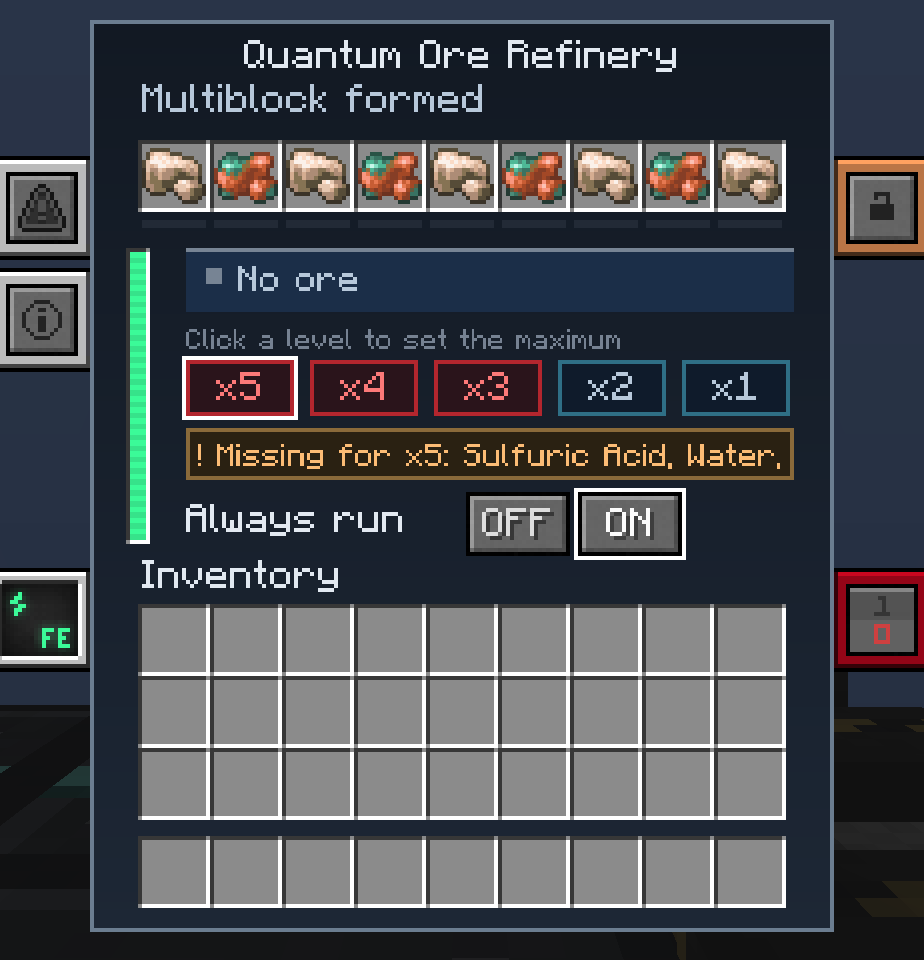
The controller opens a blue screen with Mekanism’s side tabs for the other pages. Right-clicking any block of the structure opens it, too.
- Status band: what the machine is doing, with the energy it uses per tick. The possible statuses are listed under Tips and troubleshooting.
- Five level boxes (x1 to x5): lit when the level is working now, ready when the tanks cover it, red when it is waiting for a resource, dimmed above your cap. A box is also dimmed, and reads “no recipe for this ore”, when the ore in play has no recipe at that level (a modpack’s recipes leave it out); it is not red, because no resource would open it. Hover one to see what it needs; click it to set the cap.
- Always run with its OFF and ON buttons, and a warning line (“Missing for x5: …”) naming the resource the capped level lacks.
- Nine ore slots, each with a thin progress track under it, and your inventory.
- Mekanism’s vertical power bar and Energy tab.
Output module
Section titled “Output module”Only while the structure holds the Quantum Module. See The Quantum Module.
Buffers
Section titled “Buffers”Four Mekanism gauges (sulfuric acid, water, hydrogen chloride, oxygen) with their names above and, under each, the first level that stock makes possible (“Needed from x3”, …), red while the stock is empty. Hovering a gauge gives its content.
- Production: ore processed per minute and ingots produced per minute, a graph of ingots per minute over the last five minutes (not saved with the world), the maximum multiplier now reachable, the energy usage, and the number of accelerators out of eight.
- Multipliers: a table of the five levels against the four stocks. A stock the level needs but the tanks lack for the ore in play is framed in red. Each level reads Selected, Available, Waiting (a resource is missing), Closed (the ore in play has no recipe at that level), Above max (your cap is lower) or Unavailable (this version does not deliver that level).
The Quantum Module
Section titled “The Quantum Module”The Ore Refinery Quantum Module is an optional block in the structure, at the output end: in the middle row of the second floor, directly above the place of the Output Port, or in that very place instead of the port (the structure forms with or without it). In any other cell it does not count and the controller’s screen says so. With the module in place and a frequency chosen on its screen, the ingots go into the module’s buffer of 64 stacks instead of the output slots, and every half second the buffer is sent to the destination:
- Quantum: a Quantum (Inventory) frequency, such as the ones your Quantum Entangloporters and Quantum Digital Miner use. As for the Quantum Digital Miner, a Quantum frequency holds one item type at a time.
- QIO: a QIO frequency, into the network’s storage.
The module’s screen has the Quantum | QIO choice, the list of frequencies you can use, and the state of the destination (“Connected”, “Choose a frequency”, “No frequency available”), with the buffer (“Buffer x / 64”). When the destination is full, missing or deleted, the ingots wait in the buffer (“Destination full”, “Products wait in the buffer”); nothing is lost, and they go on as soon as there is room. A full buffer stops the machine finishing jobs, exactly as a full output does. Without the module, or without a frequency, the ingots leave by the output port, and whatever the buffer still holds follows them. If the structure also has an Output Port, it is the spare buffer: what the module’s buffer cannot hold goes out by the port. If it has no Output Port, a full buffer makes the machine wait (“Output full”). If it has neither an Output Port nor a linked module, the machine does not work at all (“No output”).
The OFF and ON buttons at the top of the module’s screen turn it off without taking it out: OFF, the module is ignored as if it were not placed, the ingots (and whatever the buffer holds) leave by the output port, nothing is sent and the chosen frequencies are kept; with no Output Port the refinery waits. ON is the default.
Automation
Section titled “Automation”- Input Ports (at least five) are all the same block. A Configurator cycles one through Items, Fluids and Gases when you sneak and right click, and a message tells the new mode (a plain right click only shows it). In Wrench mode a sneaking right click takes any piece of the structure down. In item mode a port offers the nine ore slots, insert only. In fluid mode it takes water only. In gas mode it takes sulfuric acid, hydrogen chloride and oxygen only. Nothing can be pulled out through an input port.
- Output Port (none or one): every half second it offers the products to the inventories next to it, never to the structure’s own blocks. A product with no taker stays in the machine (up to 32 stacks).
- Energy Ports (at least one; the drawing has one): Joules or Forge Energy.
- A port serves one refinery only.
- Breaking the controller with a tool keeps its contents (ore, products, stocks, energy and the job under way) in the item. A Quantum Module’s chosen frequency is never kept: a placed controller starts with none.
- A refinery loads no chunk. If a chunk of the structure is not loaded, the status reads “Waiting for chunks” and nothing is lost.
Jade, WTHIT and JEI
Section titled “Jade, WTHIT and JEI”With Jade or WTHIT, looking at any block of the structure shows the refinery’s state and level, the four stocks as gauges, and for a port its mode, what it serves and how many neighbours the output port offers products to. An unformed structure tells you which block it expects and where. See JEI, Jade and WTHIT.
Configuration
Section titled “Configuration”No dedicated section in mekanismengineering-server.toml. The energy usage and storage follow Mekanism’s Enrichment
Chamber configuration; the recipes follow Mekanism’s.
| Follows Mekanism’s key | Default | Meaning |
|---|---|---|
usage.enrichmentChamber | 50 J/t | Energy per tick of one ore recipe’s 200-tick cost. |
storage.enrichmentChamber | (Mekanism’s) | The controller stores at least this, or a stack of 64 ore recipes’ worth (640,000 J at the default usage) if that is larger. |
Tips and troubleshooting
Section titled “Tips and troubleshooting”| Status | Meaning |
|---|---|
| Not formed | The structure is incomplete or wrong. The screen names the first block that is wrong or missing. |
| Waiting for chunks | A chunk of the structure is not loaded. |
| Disabled by redstone | Mekanism’s redstone control is stopping the machine. |
| No output | The structure has no Output Port and no linked Quantum Module. Nothing is worked; add a port or link the module and it goes on. |
| Not enough ore | No ore slot holds enough of an ore the refinery can work (a recipe takes several ores at once). |
| Waiting for xN | The tanks do not yet cover the level the machine waits for: the capped level with Always run OFF, the x2 with Always run ON. |
| No recipe here | Always run is OFF and the capped level is one the ore in play has no recipe for; nothing runs and nothing is taken. Click a level the ore has, or turn Always run ON. |
| Not enough energy | The job cannot pay this tick’s energy; it keeps what it paid and goes on when energy comes. |
| Waiting for resources | A finished job lacks the chemicals of its level; nothing was taken. |
| Output full | The products do not fit; the job waits and tries again every half second. |
| Running at xN | Working at level N. |
- It will not form. Compare with Structure and parts, layer by layer. Free cells (the grey “..” cells of the drawing) may be empty, glass or casing, and nothing else. The eight accelerator places take an accelerator or a casing.
- Only x2 works. The chemicals are missing: check that one Input Port is set to Fluids for water and one to Gases, and look at the Buffers screen.
- “No output” and nothing happens. The structure has no Output Port and no Quantum Module with a frequency. Build an Output Port, or choose a frequency on the module’s screen.
- Stuck at “No recipe here”. The cap is on a level the ore in the slot has no recipe for. Click a level it has (the boxes of such levels are dimmed and read “no recipe for this ore”), or turn Always run ON to work at the best level it has.
- Stuck at “Waiting for xN”. Always run is OFF and the cap is above what the tanks cover. Lower the cap by clicking a lower level, or turn Always run ON.
- An item is not taken by an input port. It is not an ore the refinery can work, or Mekanism’s Enrichment Chamber has no recipe for it: it is refused by design, sort it out before the refinery.
- Two refineries cannot share a port or a piece: the second controller does not form and says which block is taken. They may overlap only where one of the two leaves a cell free.
In-game texts
Section titled “In-game texts”What the game itself shows for this item: the description under Shift, the tooltips and the JEI information page, word for word.
 Quantum Ore Refinery Controller
- Description (hold Shift)
- Heart of the Quantum Ore Refinery: it holds the ore, the products, the water, the chemicals and the energy of the structure. The ports of the structure serve them.
- JEI · Role
- The heart of the refinery: it keeps the ore, the products, the tanks and the energy, and opens the screens.
- JEI · Supply
- Ore, water, sulfuric acid, hydrogen chloride and oxygen through the input ports; energy through the energy ports.
- JEI · Result
- Ingots from ores, from one (level x1) to five (level x5) per iron ore; each job takes the resources of its steps.
- JEI · Good to know
- Place it on the bottom front row; the structure turns with it, never mirrored.
- JEI · Good to know
- See where it goes in the structure: press U on this block, the Quantum Ore Refinery page shows it in 3D.
Written from the mod's own wiki and data files (05759a70, 2026-11-07).Mod v1.3 for Minecraft 1.21.1 (NeoForge, Mekanism 1.21.1-10.7.19.85) and Minecraft 1.20.1 (NeoForge, Mekanism 1.20.1-10.4.16.80).Block and item pictures are drawn from the game's models and textures; Mekanism's are under the MIT licence.Not an official Minecraft product, not approved by or associated with Mojang or Microsoft.